
Snowpipe, Streams, Tasks, and Dynamic Tables: Where Each One Fits
Srikar Mandava
1. Executive Summary
When working with Snowflake, most engineers quickly come across four key features: Snowpipe, Streams, Tasks, and Dynamic Tables. Each of them solves a different part of the data pipeline but understanding where each one fits is not always obvious.
In many projects, teams either overcomplicate pipelines or misuse these features simply because the boundaries between them are unclear.
This article simplifies that.
We’ll walk through:
- What each feature does
- Where it fits in a pipeline
- When to use it (and when not to)
- How to combine them into a clean, production-ready architecture
By the end, you’ll have a clear mental model to design scalable and maintainable Snowflake pipelines.
2. Background
Modern data platforms require:
- Continuous ingestion from APIs, databases, and files
- Incremental processing
- Automated transformations
- Minimal operational overhead
Snowflake provides built-in capabilities to address these needs:
- Snowpipe for automated ingestion
- Streams for change tracking
- Tasks for orchestration
- Dynamic Tables for declarative transformations
Understanding their roles is key to building efficient pipelines.
3. Problem
Teams adopting Snowflake often misuse or overuse these features due to lack of clarity.
3.1 Symptoms
Common issues include:
- Using Tasks for ingestion instead of Snowpipe
- Over-complicating pipelines with unnecessary Streams
- Replacing all transformations with Dynamic Tables without understanding limitations
- Duplicate processing or missed updates
- Poor pipeline observability
3.2 Impact
Over time, this leads to:
- Higher compute costs
- Hard-to-debug pipelines
- Data inconsistencies
- Slower performance
A small design mistake early on can scale into a big operational issue.
4. Requirements & Assumptions
In most real-world scenarios:
- Data is coming from APIs, databases, or files (S3)
- Pipelines need to run continuously or on a schedule
- Only incremental changes should be processed
- Automation is expected (minimal manual work)
With that in mind, let’s look at how each Snowflake feature fits.
5. Recommended Architecture
5.1 High-Level Flow
A clean Snowflake pipeline typically looks like this:
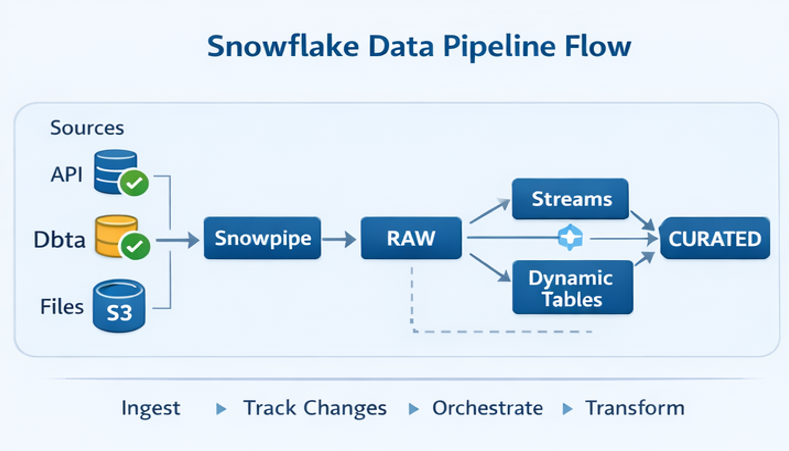
Think of it as a pipeline with clear responsibilities at each stage.
5.2 Understanding the Roles
Instead of treating all features equally, it helps to assign them clear roles:
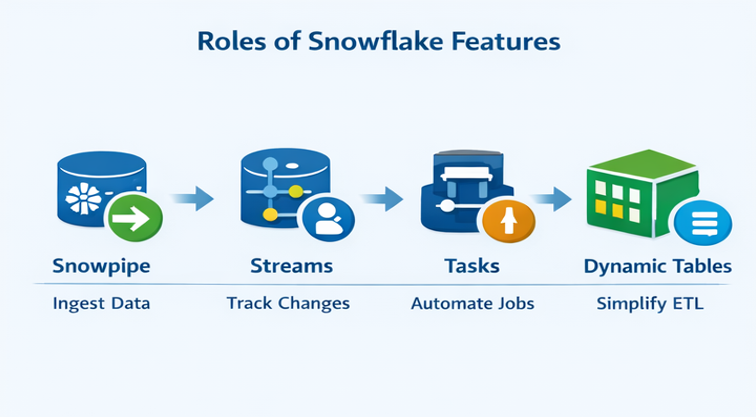
Once you see it this way, the confusion starts to disappear.
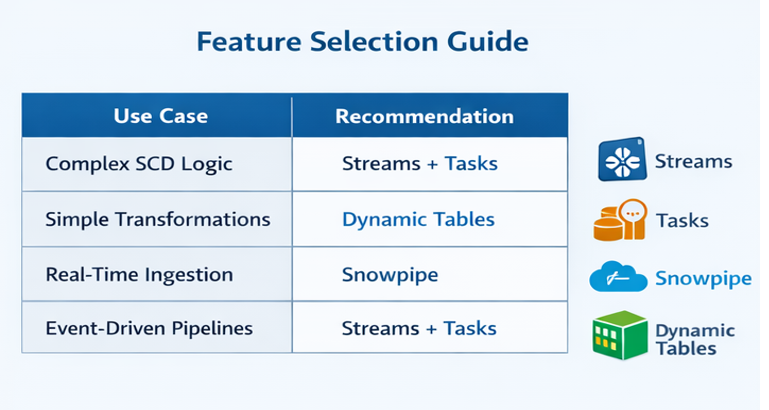
Selection Guide:
6. Implementation
6.1 Snowpipe The Ingestion Layer
Snowpipe is responsible for one thing: getting data into Snowflake automatically.
Whenever new files land in S3, Snowpipe picks them up and loads them into your RAW tables.
You should use Snowpipe when:
- Data arrives continuously
- You want near real-time ingestion
- You don’t want to manually trigger loads
It removes the need for scheduled COPY commands.
6.2 Streams Tracking What Changed
Once data is in Snowflake, the next question is:
What actually changed?
That’s where Streams come in.
Streams track:
- Inserts
- Updates
- Deletes
Instead of reprocessing entire tables, you only process the changes.
This is especially useful for:
- Incremental pipelines
- SCD logic
- Event-driven processing
6.3 Tasks Running the Pipeline
Tasks are what make your pipeline run automatically.
They can:
- Run on a schedule
- Trigger SQL queries
- Call stored procedures
- Chain multiple steps
In most pipelines, Tasks are used to:
- Read from Streams
- Apply transformations
- Load curated tables
They act as the orchestration layer.
6.4 Dynamic Tables Simplifying Transformations
Dynamic Tables are Snowflake’s newer approach to transformations.
Instead of writing Tasks and procedures, you define a table like this:
CREATE DYNAMIC TABLE curated_table AS
SELECT ...
Snowflake automatically:
- Tracks dependencies
- Refreshes data
- Keeps it up to date
They work well for:
- Simple transformations
- Derived tables
- Low-maintenance pipelines
But they are not ideal for:
- Complex business logic
- SCD Type 2 implementations
- Multi-step workflows
6.5 Putting It All Together
Here’s how they typically work together:
- Snowpipe loads data into RAW
- Streams track changes in RAW
- Tasks process those changes into STAGING/CURATED
- Dynamic Tables (optional) simplify certain transformations
You don’t have to use all of them but when used correctly, they complement each other.
6.6 End-to-End Example (Streams + Tasks)
To make this more concrete, here’s how a typical incremental pipeline works using Streams and Tasks:
-- Stream
CREATE STREAM raw_orders_stream ON TABLE raw_orders;

-- Task
CREATE TASK process_orders
AS
MERGE INTO curated_orders t
USING raw_orders_stream s
ON t.id = s.id
WHEN MATCHED AND s.updated_at > t.updated_at THEN UPDATE
WHEN NOT MATCHED THEN INSERT;
This pattern ensures that only incremental changes are processed and prevents duplicate data during retries.
It also keeps the pipeline efficient and production ready.
7. Validation & Testing
Even with automation, validation is critical.
Typical checks include:
- Row counts between source and target
- Duplicate detection
- Freshness checks using timestamps
Incremental pipelines should always be tested carefully to avoid missing or duplicating data.
8. Security & Access
A good pipeline also considers security:
- Use RBAC in Snowflake
- Restrict access between RAW, STAGING, and CURATED layers
- Secure S3 integrations for Snowpipe
This ensures both governance and auditability.
9. Performance & Cost
9.1 Performance Considerations
- Use Snowpipe for parallel ingestion
- Avoid full table scans
- Optimize queries for Dynamic Tables
9.2 Cost Drivers
- Snowpipe ingestion cost
- Warehouse compute (Tasks / Dynamic Tables)
- Storage
9.3 Cost Controls
- Auto-suspend warehouses
- Incremental processing
- Efficient file sizes
10. Operations & Monitoring
A production pipeline should always be monitored.
Focus on:
- Snowpipe ingestion status
- Task failures
- Stream backlog
- Dynamic table refresh lag
Setting up alerts early helps avoid surprises later.
11. Common Pitfalls
Some common mistakes to avoid:
- Using Tasks for ingestion instead of Snowpipe
- Not consuming Streams (data keeps accumulating)
- Using Dynamic Tables for complex logic
- Running full loads unnecessarily
- Mixing transformation logic across layers
12. Variations / Use Cases
- API ingestion pipelines
- CDC pipelines
- Financial data pipelines
- Real-time analytics systems
13. Next Steps
If you’re building pipelines in Snowflake:
- Start with a clear architecture
- Assign each feature a specific role
- Use Dynamic Tables selectively
- Add monitoring and alerts early
Conclusion
Snowflake provides powerful tools but the real value comes from using them in the right place.
A simple way to think about it:
- Snowpipe brings data in
- Streams tell you what changed
- Tasks move and transform data
- Dynamic Tables simplify where possible
When used together properly, they help you build clean, scalable, and low-maintenance data pipelines.

Srikar Mandava
Associate Data Engineer
Boolean Data Systems

Associate Data Engineer focused on designing scalable cloud data pipelines and modern data platforms. Skilled in Python, SQL, and Snowflake, with experience in ETL automation, large-scale data transformation, and building reliable data ingestion frameworks.
About Boolean Data
Systems
Boolean Data Systems is a Snowflake Premier Partner that implements solutions on cloud platforms. We help enterprises make better business decisions with data and solve real-world business analytics and data challenges.
Services and
Offerings
Follow us on
Solutions &
Accelerators
Global
Head Quarters
USA - Atlanta
3970 Old Milton Parkway,
Suite #200, Alpharetta, GA 30005
Ph. : 770-410-7770
Fax : 855-414-2865