
Cortex AI Use Cases That Actually Make Sense for Enterprise Data Teams
Aravindan Selvakumar
1. Executive Summary
Problem:
Enterprise data teams want to leverage AI/LLMs but face challenges in governance, cost control, reliability, and operational complexity.
Recommended approach/pattern:
Use Snowflake Cortex within the data platform with an added control layer for:
- Cost governance
- Output validation
- Observability
- Safe execution
Where it fits (best use cases):
- Text summarization (non-critical reporting)
- Sentiment analysis (trend-level insights)
- Semantic search (knowledge discovery)
- Data quality classification (non-deterministic insights)
Where it should NOT be used:
- Financial reporting requiring deterministic outputs
- Regulatory decisions without human validation
Key outcomes:
- Reduced data movement
- Controlled AI adoption
- Governed and observable AI pipelines
What the reader can implement:
- Production-ready Cortex architecture with guardrails
- Cost-aware AI pipelines
- Validation-driven AI outputs
2. Background
Enterprises have centralized data platforms, but AI adoption introduces:
- Data movement risks
- Governance gaps
- High infrastructure overhead
Snowflake Cortex reduces infrastructure complexity but introduces new challenges:
- Non-deterministic outputs
- Cost unpredictability
- Output validation requirements
Therefore, Cortex must be used with control mechanisms, not standalone.
3. Problem
3.1 Symptoms
- Data exported to external AI tools
- No control over AI costs
- Inconsistent AI outputs
- Lack of auditability
3.2 Impact
- Unpredictable costs
- Data governance violations
- Low trust in AI outputs
- Pipeline instability
4. Requirements & Assumptions
4.1 Data & SLA
- Volume: GB–TB (text-heavy datasets)
- SLA: Batch (hourly/daily recommended for AI workloads)
- Real-time: Only for low-volume, controlled use cases
4.2 Security & Compliance
PII must be:
- Masked before Cortex usage
- Tokenized where required
Access:
- RBAC + least privilege
- Separate roles for AI execution
4.3 Tooling & Constraints
- Orchestration: Airflow / Tasks
- Transformation: dbt / SQL
- Constraint: Limited ML expertise
5. Recommended Architecture
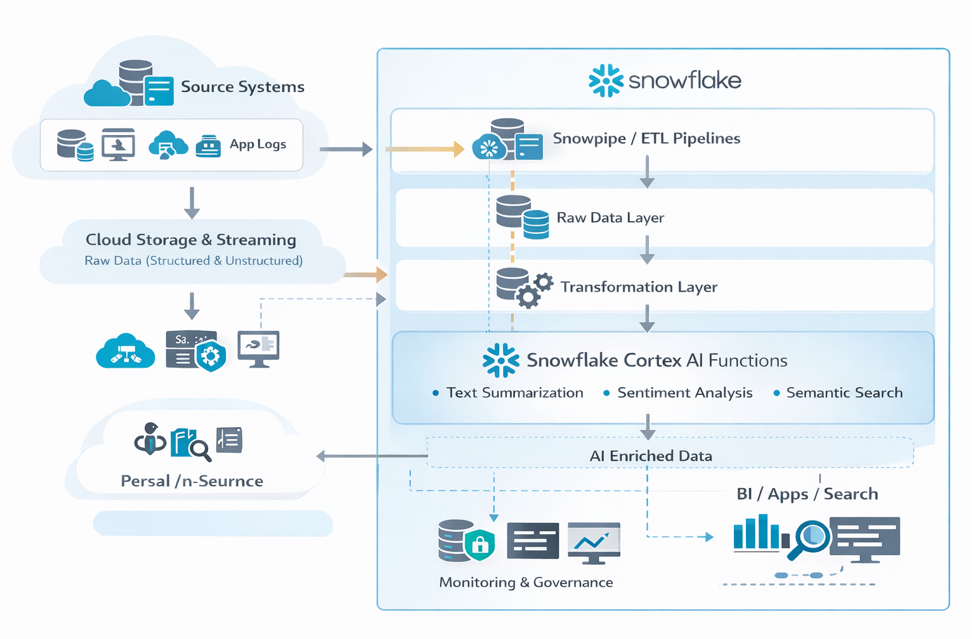
5.1 High-Level Flow
Data is ingested from operational systems into Snowflake using Snowpipe or ETL pipelines.
Raw data is stored in staging schemas.
Transformation pipelines prepare structured and semi-structured datasets.
Snowflake Cortex functions are applied for AI tasks (summarization, classification, embeddings).
AI-enriched datasets are stored in curated layers.
Analytics tools and applications consume the enriched data.
Monitoring and governance are handled through Snowflake roles and audit logs.
5.2 Architecture Diagram
5.3 Options
Option A: Cortex Native (Recommended)
Best for:
- Governed environments
- Minimal ML infrastructure
Option B: External AI
Use when:
- Custom models required
- Fine-tuning needed
6. Implementation
6.1 Setup
CREATE WAREHOUSE AI_WH;
CREATE DATABASE AI_ANALYTICS;
CREATE SCHEMA AI_ANALYTICS.CORTEX_USE_CASES;
6.2 Core Build Steps
- Ingest data
- Clean and preprocess text
- Apply input validation (PII / size checks)
- Run Cortex functions
- Apply output validation rules
- Store: Valid → curated tables, Invalid → quarantine tables
7. Validation & Testing
7.1 AI Output Validation
- Domain validation
- Null checks
- Length checks
7.2 AI-Specific Validation (NEW)
- Confidence thresholds
- Keyword consistency checks
- Drift detection (weekly comparison)
7.3 Reconciliation
- Record count match
- Timestamp alignment
- Re-run comparison (detect AI drift)
8. Security & Access
Key Enhancements
- Mask sensitive fields before AI
- Restrict Cortex usage to specific roles
GRANT USAGE ON FUNCTION SNOWFLAKE.CORTEX.SENTIMENT TO ROLE AI_ROLE;Auditability
Track:
- Who executed AI queries
- What data was processed
- Cost impact
9. Performance & Cost
9.1 Performance
- Batch processing preferred
- Avoid row-by-row execution
9.2 Cost Drivers (Updated)
- Token usage (implicit in queries)
- Warehouse compute
- Frequency of execution
9.3 Cost Controls (Production-Level)
- Resource monitors
- Query tagging
- Budget alerts
- Controlled execution via stored procedures
10. Operations & Monitoring
10.1 What to Monitor
- Pipeline success/failure
- AI output rejection rate
- Cost per use case
- Data freshness
10.2 Alerting
Trigger alerts when:
- Cost spikes
- Output anomalies increase
- AI failure rate increases
10.3 Runbook (Top Issues)
Issue: Cortex query timeout
Increase warehouse size or optimize query
Issue: Incorrect AI outputs
Review prompt logic or preprocessing
Issue: Cost spikes
Monitor warehouse usage and auto-suspend settings
11. Common Pitfalls
- Treating AI outputs as deterministic
- Running Cortex on full datasets without filtering
- No validation layer
- Ignoring cost tracking
- Using AI for critical reporting
12. Variations / Use Cases
AI-Powered Document Summarization
Summarize contracts, reports, or support tickets stored in Snowflake.
Customer Feedback Sentiment Analysis
Automatically classify and analyze customer feedback.
Semantic Search
Use embeddings generated by Cortex to enable intelligent search across enterprise documents.
Data Quality Monitoring
Use AI to detect anomalies or categorize data issues in operational datasets.
13. Next Steps
- Build a Cortex AI proof of concept on an existing dataset.
- Identify high-value text-based analytics use cases.
- Establish governance policies for AI usage within Snowflake.
14. Appendix
Full Scripts
1. Sample Table Setup
CREATE OR REPLACE TABLE CUSTOMER_FEEDBACK (
    review_id STRING,
    review_text STRING,
    load_timestamp TIMESTAMP
);
2. Cortex Sentiment Analysis
CREATE OR REPLACE TABLE FEEDBACK_WITH_SENTIMENT AS
SELECT
    review_id,
    review_text,
    SNOWFLAKE.CORTEX.SENTIMENT(review_text) AS sentiment,
    load_timestamp
FROM CUSTOMER_FEEDBACK;
3. Cortex Summarization
CREATE OR REPLACE TABLE DOCUMENT_SUMMARY AS
SELECT
    doc_id,
    document_text,
    SNOWFLAKE.CORTEX.SUMMARIZE(document_text) AS summary
FROM DOCUMENTS;
4. Embedding Generation (Semantic Search)
CREATE OR REPLACE TABLE DOCUMENT_EMBEDDINGS AS
SELECT
    doc_id,
    SNOWFLAKE.CORTEX.EMBED_TEXT(document_text) AS embedding
FROM DOCUMENTS;
Config Samples
1. Warehouse Configuration
CREATE WAREHOUSE AI_WH
WITH
    WAREHOUSE_SIZE = 'SMALL'
    AUTO_SUSPEND = 60
    AUTO_RESUME = TRUE;
2. Role & Access Setup
CREATE ROLE AI_ROLE;

GRANT USAGE ON WAREHOUSE AI_WH TO ROLE AI_ROLE;
GRANT USAGE ON DATABASE AI_ANALYTICS TO ROLE AI_ROLE;
GRANT USAGE ON SCHEMA AI_ANALYTICS.PUBLIC TO ROLE AI_ROLE;
GRANT SELECT, INSERT ON ALL TABLES IN SCHEMA AI_ANALYTICS.PUBLIC TO ROLE AI_ROLE;
3. Task for Scheduled AI Processing
CREATE OR REPLACE TASK RUN_AI_ENRICHMENT
WAREHOUSE = AI_WH
SCHEDULE = 'USING CRON 0 * * * * UTC'
AS
INSERT INTO FEEDBACK_WITH_SENTIMENT
SELECT
    review_id,
    review_text,
    SNOWFLAKE.CORTEX.SENTIMENT(review_text),
    CURRENT_TIMESTAMP
FROM CUSTOMER_FEEDBACK;
4. Error Handling Pattern
- Use staging tables before final insert
- Log failed records into error tables
- Enable retry logic in orchestration (Airflow / Tasks)
Glossary
| Term | Definition |
|---|---|
| Snowflake Cortex | Built-in AI/LLM capabilities within Snowflake |
| LLM (Large Language Model) | AI model used for text generation, summarization, and classification |
| Embedding | Numerical representation of text used for semantic search |
| Semantic Search | Search based on meaning rather than exact keywords |
| Raw Layer | Initial ingestion layer storing unprocessed data |
| Transformation Layer | Cleaned and structured data layer |
| Curated Layer | Business-ready, analytics-ready data |
| AI-Enriched Data | Data enhanced with AI outputs like sentiment, summaries, or classifications |
| Snowpipe | Continuous data ingestion service in Snowflake |
| Task | Scheduled execution mechanism in Snowflake |
| RBAC | Role-Based Access Control for managing permissions |

Aravindan Selvakumar
Data Engineer
Boolean Data Systems

Aravindan S is a Data Engineer at Boolean Data Systems, specializing in building scalable data pipelines and modern cloud data platforms. He focuses on data transformation and modeling, with expertise in Snowflake and dbt for developing efficient ELT pipelines. He has hands-on experience in implementing Snowpipe, Tasks, and dbt-based workflows to enable reliable and maintainable data processing.
About Boolean Data
Systems
Boolean Data Systems is a Snowflake Premier Partner that implements solutions on cloud platforms. We help enterprises make better business decisions with data and solve real-world business analytics and data challenges.
Services and
Offerings
Follow us on
Solutions &
Accelerators
Global
Head Quarters
USA - Atlanta
3970 Old Milton Parkway,
Suite #200, Alpharetta, GA 30005
Ph. : 770-410-7770
Fax : 855-414-2865