Building a Scalable ADP to Snowflake Data Pipeline Using AWS S3, Python, and Serverless Compute
Jagadishwar Pannala
1. Executive Summary
Organizations that use ADP for workforce and payroll management often need to integrate this operational data into modern analytics platforms such as Snowflake. However, ADP primarily exposes its data through REST APIs, which introduces several challenges around authentication, pagination, rate limits, and reliable data ingestion.
This blog describes a production-grade architecture for extracting ADP data using Python, landing the raw data in AWS S3, and ingesting it into Snowflake for analytics.
Recommended Architecture Pattern
The recommended pipeline follows this architecture:
ADP API → Python Extraction → AWS S3 Landing → Snowflake Ingestion → Curated Analytics
Where This Pattern Fits
This architecture works best when:
- ADP APIs are the primary source of HR data
- Snowflake is used as the enterprise analytics platform
- Data pipelines require scalability, reliability, and observability
Key Outcomes
Implementing this architecture provides:
- Scalable API ingestion
- Secure credential management
- Reliable orchestration
- Cost-efficient data loading
- End-to-end observability
What the Reader Can Implement: By the end of this blog, readers will understand how to build a production-ready ADP data ingestion pipeline using AWS and Snowflake.
2. Background
Modern organizations rely on HR and payroll analytics for workforce planning, compliance, and operational reporting. While platforms such as ADP provide comprehensive workforce management capabilities, extracting data from these systems for analytics requires integrating with their APIs.
API-based ingestion introduces several operational considerations including:
- Authentication management
- API rate limits
- Pagination logic
- Incremental data extraction
- Reliable scheduling
To address these challenges, many organizations implement a landing-zone based ingestion architecture. In this model:
Source API → Landing Storage → Data Warehouse
AWS S3 acts as the durable landing zone, allowing teams to store raw API responses before loading them into Snowflake. This architecture enables:
- Replayability
- Data lineage tracking
- Incremental processing
- Scalable transformations
3. Problem
Directly ingesting ADP API data into Snowflake can introduce operational complexity.
3.1 Symptoms
Organizations often encounter the following challenges:
- ADP APIs return paginated responses, requiring custom logic to retrieve complete datasets.
- APIs enforce rate limits, which must be handled gracefully.
- Authentication requires OAuth tokens and certificate-based security.
- Pipelines must run reliably on schedules.
- Raw API responses must be preserved for traceability and reprocessing.
3.2 Impact
Without a robust ingestion framework, HR reporting pipelines become unreliable, engineering teams spend excessive time maintaining scripts, debugging failures becomes difficult, and scaling across multiple endpoints becomes complex.
4. Requirements & Assumptions
4.1 Data & SLA
- Data volume: Thousands to millions of records per month
- Freshness SLA: Hourly or daily ingestion
- Environments: Dev / UAT / Production
4.2 Security & Compliance
- Data sensitivity: Employee PII
- Access model:
- Snowflake RBAC
- AWS IAM roles
- Service accounts for API access
4.3 Tooling & Constraints
- Ingestion tool: Python API framework
- Orchestration: AWS Fargate / Lambda / Step Functions
Constraints: API rate limits, Pagination, Schema drift, and OAuth token expiration.
5. Recommended Architecture
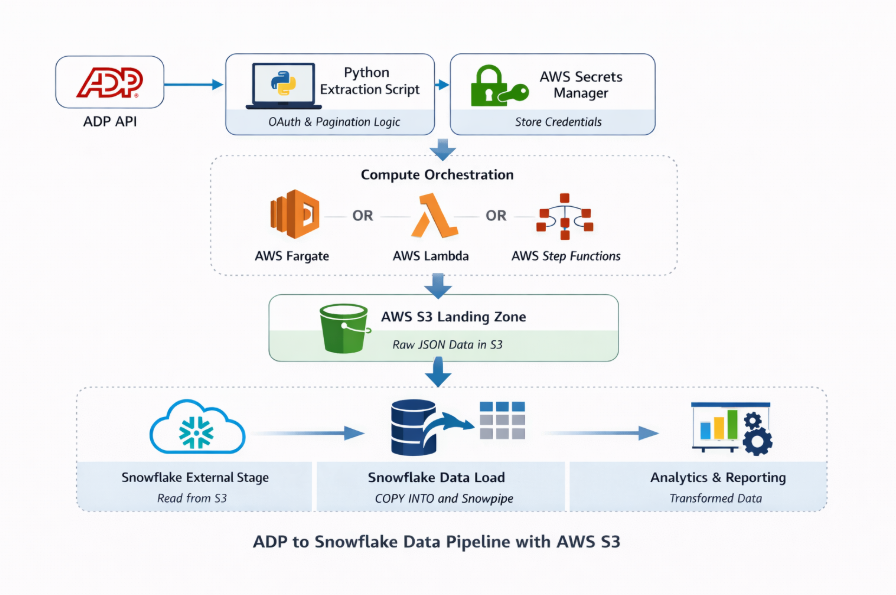
5.1 High-Level Flow
- Python extraction service authenticates with ADP OAuth API.
- API data is retrieved using pagination logic.
- Data is serialized into JSON format.
- JSON files are compressed into gzip format.
- Files are stored in AWS S3 landing zone.
- Snowflake external stage references the S3 location.
- Data ingestion occurs through Snowpipe (automated) or COPY INTO (batch).
- Raw data is stored in Snowflake raw tables.
- Snowflake Tasks execute transformations into curated tables.
- Analytics tools consume curated datasets.
5.2 Architecture Diagram
The architecture consists of three logical layers:
Extraction Layer
- A Python-based ingestion service extracts ADP data using OAuth authentication and pagination logic.
- This extraction service runs on AWS Fargate or AWS Lambda.
Landing Layer
- Extracted data is stored in AWS S3 as compressed JSON files.
- Provides durability, replay capability, and raw data lineage.
Warehouse Layer
- Snowflake loads data from S3 using external stages and ingestion pipelines.
- Transformations are executed using Snowflake Tasks.
5.3 Options
Option A — AWS Fargate (Recommended)
- Advantages: Handles large datasets, supports long-running workloads, and containerized deployments.
Option B — AWS Lambda
- Advantages: Fully serverless; ideal for lightweight workloads.
- Limitations: 15-minute runtime limit.
Option C — Step Functions + Lambda
- Advantages: Workflow orchestration, parallel endpoint processing, and built-in retries.
6. Implementation
6.1 Setup
AWS Components
- AWS S3 – Raw landing storage
- AWS Secrets Manager – Secure credential storage
- AWS Fargate – Python container execution
- AWS Lambda – Lightweight execution option
- AWS Step Functions – Workflow orchestration
- AWS IAM – Access control
- AWS CloudWatch – Logging and monitoring
- AWS SES – Email notifications for failures
Snowflake Objects
- Database
- Schemas
- Warehouses
- External stages
- Pipes
- Tasks
- File formats
6.2 Core Build Steps
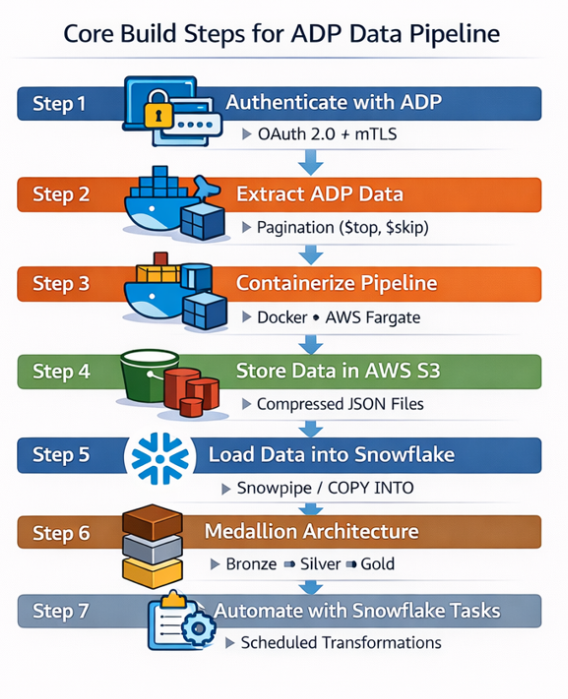
Step 1 — Authenticate with ADP
Before extracting data from ADP APIs, the pipeline must authenticate using OAuth 2.0 with mutual TLS (mTLS).
To authenticate successfully, the following components are required:
- Client ID and Client Secret obtained from the ADP Developer Portal
- Client certificate and private key used for mutual TLS authentication
- OAuth token endpoint to generate an access token
- Secure credential storage such as AWS Secrets Manager to protect sensitive information
Once the access token is generated, it is included in the API requests to authorize data extraction from ADP.
Step 2 — Extract ADP Data with Pagination
The extraction framework retrieves records using pagination. Key logic includes:
- $top and $skip parameters
- next-page detection
- endpoint-based extraction
This ensures complete retrieval of large datasets.
Step 3 — Containerize Pipeline for Fargate
The Python extraction application is packaged into a Docker container to ensure consistent deployment and runtime environments.
Key points:
- Package the Python extraction script and dependencies into a Docker image
- Deploy the container using AWS ECS with Fargate
- Fargate provides a serverless container execution environment
- Schedule pipeline runs using Amazon EventBridge
Enables scalable and reliable execution without managing infrastructure.
Step 4 — Store Data in AWS S3
After extracting data from the ADP APIs, the records are stored in AWS S3 as compressed JSON files. AWS S3 acts as the raw landing layer in the data pipeline, ensuring that the original API responses are preserved before loading them into Snowflake.
Key benefits of using S3 as the landing zone include:
- Durability and scalability for large datasets
- Replayability in case data needs to be reprocessed
- Separation of ingestion and transformation layers
The data files are compressed (for example using gzip) to reduce storage costs and improve downstream ingestion performance when loading data into Snowflake.
Step 5 — Load Data into Snowflake
After the data is stored in AWS S3, Snowflake can access these files using an external stage that references the S3 location.
Key points:
- Configure a Snowflake external stage pointing to the S3 bucket where ADP data files are stored
- Use a storage integration to securely connect Snowflake with AWS S3
- Snowflake supports multiple ingestion methods depending on pipeline requirements:
- Snowpipe (Near Real-Time Ingestion): Automatically loads files when they arrive in S3; Uses event notifications to trigger ingestion; Suitable for near real-time data pipelines.
- COPY INTO (Batch Ingestion): Used for scheduled or manual batch data loading; Often triggered through orchestration tools or scheduled workflows; Suitable for large periodic loads or historical backfills.
Using both Snowpipe and COPY INTO provides flexibility to support both real-time and batch data ingestion scenarios.
Step 5 — Load Data into Snowflake
After the data is stored in AWS S3, Snowflake can access these files using an external stage that references the S3 location.
Key points:
- Configure a Snowflake external stage pointing to the S3 bucket where ADP data files are stored
- Use a storage integration to securely connect Snowflake with AWS S3
- Snowflake supports multiple ingestion methods depending on pipeline requirements:
- Snowpipe (Near Real-Time Ingestion): Automatically loads files when they arrive in S3; Uses event notifications to trigger ingestion; Suitable for near real-time data pipelines.
- COPY INTO (Batch Ingestion): Used for scheduled or manual batch data loading; Often triggered through orchestration tools or scheduled workflows; Suitable for large periodic loads or historical backfills.
Using both Snowpipe and COPY INTO provides flexibility to support both real-time and batch data ingestion scenarios.
Step 6 — Data Transformation Using Medallion Architecture
After ingestion into Snowflake, the data is organized using the Medallion Architecture, which structures data into multiple layers for better data quality and analytics.
- Raw Layer (Bronze): Stores raw data ingested directly from ADP APIs through S3; Preserves the original source data for traceability.
- Staging Layer (Silver): Cleans and standardizes the raw data; Handles validation, transformations, and deduplication.
- Curated Layer (Gold): Contains business-ready datasets; Used for analytics, reporting, and BI tools.
This layered approach improves data quality, governance, and analytical usability within Snowflake. Once the curated layer is established, organizations can further implement Master Data Management (MDM) to create unified entities such as employees, departments, or payroll structures across multiple systems.
Step 7 — Automate Transformations with Snowflake Tasks
Snowflake Tasks are used to automate data transformation workflows within the warehouse.
Key points:
- Snowflake Tasks allow scheduled execution of SQL queries or transformation pipelines
- Used to move data between Bronze, Silver, and Gold layers
- Supports cron-based scheduling for automated processing
- Eliminates the need for external schedulers for many transformation workloads
This enables automated data processing and ensures that curated datasets remain continuously updated for analytics and reporting.
6.3 Configuration Defaults
- Watermark strategy: UpdatedAt timestamp
- Dedup keys: Worker ID
- Load frequency: Hourly or daily
- Error handling: Retry with exponential backoff
- Logging: AWS CloudWatch
7. Validation & Testing
7.1 Data Validation
After loading the data into Snowflake, basic validation checks are performed to ensure data quality and reliability.
- Row Count Check: Verifies that the expected number of records has been loaded into the target table.
- Duplicate Check: Ensures that duplicate records are not present for key identifiers such as worker IDs.
- Freshness Check: Confirms that the latest data has been successfully ingested into the system.
These validation checks help maintain data completeness, accuracy, and timeliness within the Snowflake data pipeline.
7.2 Reconciliation
In addition to validation checks, periodic reconciliation should be performed to ensure that the data extracted from ADP APIs matches the data loaded into Snowflake.
Key reconciliation activities include:
- Source vs Target Comparison: Compare the total number of records returned by the ADP APIs with the number of records loaded into Snowflake tables.
- Data Completeness Verification: Ensure that all expected records from the source system have been successfully ingested.
- Incremental Load Validation: Verify that newly created or updated records are properly captured during incremental data extraction.
- Data Consistency Checks: Confirm that key fields such as worker identifiers or timestamps match between the source API data and Snowflake tables.
Regular reconciliation helps maintain data integrity, reliability, and trust in the analytics pipeline.
8. Security & Access
Security practices include:
- Snowflake RBAC permissions
- AWS IAM role-based access
- Secrets stored in AWS Secrets Manager
- Certificate-based authentication for ADP APIs
- Audit logging via CloudWatch and Snowflake query history
9. Performance & Cost
9.1 Performance Considerations
- Use compressed JSON files
- Optimize file sizes between 100–250 MB
- Use parallel COPY operations
- Use Snowpipe for continuous ingestion
9.2 Cost Drivers
- Snowflake compute
- S3 storage
- AWS Fargate runtime
9.3 Cost Controls
- Snowflake auto-suspend warehouses
- Resource monitors
- Optimized file sizes
- Scheduled ingestion pipelines
10. Operations & Monitoring
10.1 What to Monitor
- Pipeline success/failure rate
- Data freshness
- API errors
- S3 ingestion volume
10.2 Alerting
Alerts should trigger when:
- API extraction fails
- Snowflake ingestion fails
- Data volume anomalies occur
10.3 Runbook
| Issue | Resolution |
|---|---|
| API token expired | Refresh credentials |
| Pagination error | Restart extraction job |
| Snowflake ingestion failure | Validate file format |
10.4 Email Notifications Using AWS SES
Amazon SES can be used to notify stakeholders when pipeline failures occur.
Typical flow:
Pipeline Failure → CloudWatch Alarm → AWS SES → Email Notification
This ensures engineering teams are alerted immediately when failures occur.
11. Common Pitfalls
- Ignoring API rate limits
- Not storing raw API responses
- Missing retry logic
- Improper file sizing
- Schema evolution issues
12. Variations / Use Cases
- API ingestion for HR systems
- CDC pipelines for operational databases
- BI analytics pipelines
- ML workforce analytics
- Incremental ingestion using timestamp filters
13. Next Steps
Possible enhancements include:
- Implement incremental ingestion
- Add data quality validation frameworks
- Automate schema evolution
- Introduce orchestration workflows using Step Functions
14. Appendix
Technologies Used
Python, AWS S3, AWS Secrets Manager, AWS Fargate, AWS Lambda, AWS Step Functions, AWS CloudWatch, AWS SES, Docker, Snowflake
Conclusion
In this blog, we explored an end-to-end architecture for extracting ADP data using Python, storing it in AWS S3, and loading it into Snowflake for analytics. By leveraging AWS services for secure credential management and scalable execution, the pipeline ensures reliable data ingestion from ADP APIs.
Using Snowpipe or COPY INTO for ingestion, combined with the Medallion architecture (Bronze, Silver, Gold) and Snowflake Tasks for automation, organizations can build a scalable and maintainable data platform. This approach enables efficient workforce data integration while supporting modern analytics and reporting in Snowflake.

Jagadishwar Pannala
Associate Data Engineer
Boolean Data Systems

Jagadishwar Pannala is a Data Engineer at Boolean Data Systems, specializing in building scalable data pipelines and modern cloud data platforms. He focuses on data migration and cloud-based data engineering, with expertise in Snowflake, cloud data architectures, and ETL/ELT pipeline development to support reliable and efficient enterprise analytics.
About Boolean Data
Systems
Boolean Data Systems is a Snowflake Premier Partner that implements solutions on cloud platforms. We help enterprises make better business decisions with data and solve real-world business analytics and data challenges.
Services and
Offerings
Follow us on
Solutions &
Accelerators
Global
Head Quarters
USA - Atlanta
3970 Old Milton Parkway,
Suite #200, Alpharetta, GA 30005
Ph. : 770-410-7770
Fax : 855-414-2865