
Building Production-Ready Data Pipelines Faster with Snowflake Cortex Code
Aravindan Selvakumar
1. Executive Summary
Problem: Data teams are under pressure to deliver faster, but most AI-assisted coding leads to shortcuts—missing validation, weak error handling, and non-production-ready pipelines.
Recommended approach/pattern: Use Snowflake Cortex (Cortex Code) not just for generating SQL, but for designing, validating, and operationalizing complete production-grade data pipelines.
Where it fits
- Data ingestion pipelines
- ELT transformations
- Validation frameworks
- Monitoring & alerting systems
Key outcomes
- Faster development with standardized and structured SQL generation
- Built-in validation and reconciliation driven by Cortex-assisted design
- Automated monitoring and alerting with identified failure scenarios
- Production-ready pipeline design with idempotent and incremental patterns
What you can implement: A real-world ingestion + transformation + monitoring pipeline where Cortex Code is used to guide SQL generation, validation logic, and operational design using Snowflake-native capabilities.
2. Background
AI tools are increasingly used in data engineering—but most implementations fail in production because:
- They generate SQL, not systems
- They ignore validation and edge cases
- They don’t handle failures
Instead of using AI for shortcuts, we used Snowflake Cortex (Cortex Code) to accelerate system design, enforce structured SQL patterns, and identify missing validation and operational gaps early in development.
The goal was not just to generate queries, but to build a production-grade pipeline that a CTO would trust in real-world environments.
3. Problem
3.1 Symptoms
- Manual pipeline development is slow, especially without standardized SQL patterns
- Missing validation leads to bad data and unreliable outputs
- No monitoring for ingestion failures or partial loads
- Reprocessing causes duplicates due to non-idempotent logic
- Inconsistent SQL and design patterns when using AI tools without proper guidance
3.2 Impact
- Data quality issues impacting downstream analytics
- Operational instability due to lack of validation and monitoring
- High support overhead from manual fixes and reprocessing
- Loss of stakeholder trust in data reliability
- Increased cost due to inefficient or poorly optimized queries generated by AI tools
4. Requirements & Assumptions
4.1 Data & SLA
- High-volume ingestion (millions of rows)
- Daily + near real-time ingestion
- Multi-layer architecture (Raw → Silver → Curated)
4.2 Security & Compliance
- Controlled access via roles
- No data movement outside platform
4.3 Tooling
- Snowpipe
- Streams & Tasks
- SQL-based transformations
- Snowflake Cortex (Cortex Code) for SQL generation, validation design, and pipeline acceleration
5. Recommended Architecture
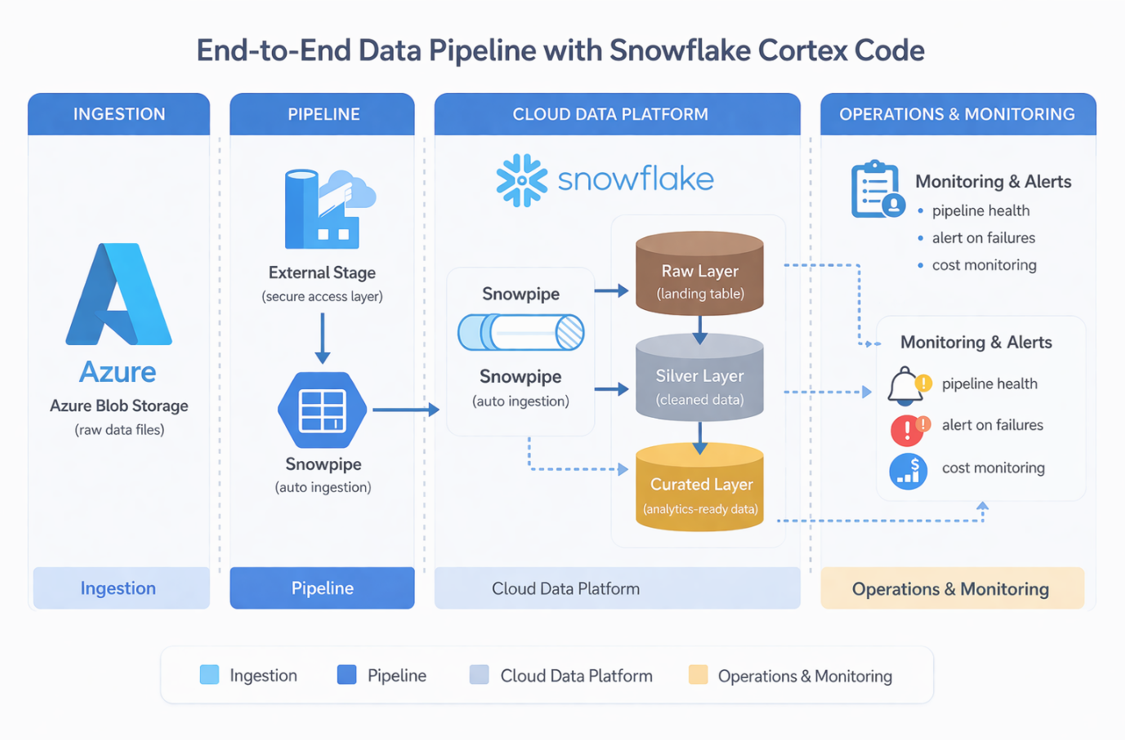
5.1 High-Level Data Flow
- Azure Blob: Source systems drop raw data files into cloud storage.
- External Stage: Snowflake securely references external files without data movement.
- Snowpipe: Automatically ingests new files into Snowflake in near real-time.
- Raw Layer: Stores data as-is with metadata for traceability and audit.
- Stream: Captures incremental changes from raw tables for downstream processing.
- MERGE: Applies idempotent logic to safely insert/update records without duplication.
- Silver Layer: Cleans, standardizes, and structures data for consistency using transformation logic designed with Snowflake Cortex (Cortex Code).
- Curated Layer: Applies business logic to create analytics-ready datasets (Power BI/reporting ready), with transformations refined using Cortex-assisted SQL generation.
- Monitoring & Alerts: Ensures pipeline reliability with failure detection and notifications, with Cortex Code helping identify missing monitoring and validation scenarios.
5.3 Why Cortex Code Matters
- Generate structured SQL patterns
- Identify missing validation checks
- Build production-ready logic faster
6. Implementation
6.1 Setup
We set up the Snowflake environment to support a scalable, automated, and production-ready data pipeline, with Snowflake Cortex (Cortex Code) used to guide setup decisions, SQL generation, and validation patterns.
Core Setup Components
- External Storage (Azure Blob): Acts as the landing zone for raw source files
- External Stage: Securely connects Snowflake to Azure Blob using storage integration
- File Formats: Defined for consistent ingestion (CSV, GZIP, etc.)
- Warehouses: Dedicated compute for ETL and monitoring/tasks
Cortex Code Contribution
- Helped define ingestion patterns (stage → Snowpipe)
- Suggested consistent SQL structures for setup
- Identified missing configurations (validation, monitoring readiness)
Example: Storage Integration
CREATE STORAGE INTEGRATION
  TYPE = EXTERNAL_STAGE
  STORAGE_PROVIDER = 'AZURE'
  ENABLED = TRUE
  AZURE_TENANT_ID = ''
  STORAGE_ALLOWED_LOCATIONS = (
    'azure://.blob.core.windows.net///'
); - Uses Azure AD-based authentication
- No credentials stored in Snowflake
- Restricts access to specific storage paths
Example: External Stage Setup
CREATE OR REPLACE STAGE NISC_DEV_BRONZE.EXTERNAL.NISC_STAGE
URL = 'azure://.blob.core.windows.net///'
STORAGE_INTEGRATION = AZURE_BLOB_INT;
Example: File Format
CREATE OR REPLACE FILE FORMAT NISC_FILE_FORMAT
TYPE = 'CSV'
COMPRESSION = 'GZIP'
SKIP_HEADER = 1;
Example: Warehouse
CREATE WAREHOUSE WH_NISC_DEV_LOAD
WAREHOUSE_SIZE = 'SMALL'
AUTO_SUSPEND = 60
AUTO_RESUME = TRUE;
6.2 Core Build Steps
1. Ingestion Pipeline
Files land in Azure Blob, External Stage references files, and Snowpipe auto-ingests data.
2. Raw Layer Design
Stores data as-is and adds metadata like SOURCE_FILE and LOADED_AT.
3. Bulk Load + Snowpipe
Use COPY INTO for historical data and Snowpipe for incremental ingestion.
4. Stream-Based Processing
Capture only new data and avoid full table reload patterns.
5. Idempotent Transformation
MERGE logic prevents duplicates and enables safe reprocessing.
6. Silver + Curated Layers
Transform, standardize, and prepare analytics-ready datasets.
Example: Bulk Load
COPY INTO NISC_AMI_RAW
FROM @NISC_STAGE
FILE_FORMAT = NISC_FILE_FORMAT;
Example: Stream-Based Incremental Processing
CREATE STREAM NISC_AMI_RAW_STREAM
ON TABLE NISC_AMI_RAW;
Example: Task-Based Automation
CREATE TASK LOAD_TASK
SCHEDULE = 'USING CRON 30 12 * * *'
AS CALL LOAD_PROCEDURE();
6.3 Configuration Defaults
- Ingestion Strategy: Snowpipe for incremental loads, COPY INTO for bulk loads
- Processing Strategy: Stream-based incremental processing, MERGE-based transformations
- Data Strategy: Raw → Silver → Curated (Medallion Architecture)
- Cost Optimization: Auto-suspend warehouses, batch processing
- Monitoring: Pipeline-level monitoring, alerting on failures, data validation checks
7. Validation & Testing
7.1 Governance Validation
Validation is where most AI-assisted pipelines fail. Using Snowflake Cortex (Cortex Code), we designed a structured validation layer—not just queries, but a reusable framework integrated into the pipeline.
- Identify missing validation scenarios across ingestion and transformation layers
- Generate standardized validation SQL patterns
- Enforce consistency of checks across multiple pipelines
- Highlight edge cases often missed in manual development
Validation Layers Implemented
- File-Level Validation: Files received vs expected, Stage vs Snowpipe ingestion
- Row-Level Validation: Row count reconciliation, incremental load validation
- Data Quality Checks: Null checks, data type validation, invalid values detection
- Duplicate Detection: Business key validation, Stream vs target consistency
Key Insight: Cortex Code helped us think beyond “load data” → “trust data”.
7.2 Reconciliation
- Source vs Raw row count
- Raw vs Silver transformed data
- Silver vs Curated aggregated outputs
8. Security & Access
Security was implemented using Snowflake-native controls, but Cortex Code helped ensure nothing was missed.
- Role-based access (RBAC)
- Restricted access to raw layer
- Curated layer exposed to BI users
9. Performance & Cost
9.1 Performance Considerations
- Use appropriate warehouse size
- Optimize queries
- Use result caching
9.2 Cost Drivers
- Warehouse compute time
- Query complexity
- Data scanning
9.3 Cost Controls
- Workload isolation (ETL vs BI)
- Query tagging for attribution
- Resource monitors for budgeting
- Review Cortex-generated SQL before production deployment
- Enforce prompt standards to avoid full table scans
10. Operations & Monitoring
10.1 What to Monitor
- Pipeline execution status
- Snowpipe ingestion
- Data freshness
- Cost usage
10.2 Alerting
- Pipeline failures
- No file arrival
- Failed loads
- Partial ingestion
Runbook (Top Issues)
Issue: High Cost Due to Cortex-Generated Queries
Cortex-generated SQL may scan full tables or miss incremental logic.
Issue: Poor Prompt Leading to Wrong Output
Vague prompts result in incomplete or incorrect pipeline logic.
11. Common Pitfalls
- Using Snowflake Cortex only for SQL generation instead of system design
- Poor prompt design leading to incorrect or inefficient queries
- Over-reliance on AI without validating business logic and data correctness
- Ignoring incremental processing (Streams) and generating full table scans
- Building non-idempotent pipelines (INSERT instead of MERGE)
- Missing validation layer (no row count, null, or duplicate checks)
- Not reviewing Cortex-generated SQL for performance and cost impact
- Lack of monitoring and alerting in AI-generated pipelines
- Inconsistent code patterns due to non-standardized prompts
- No cost control strategy for Cortex-generated workloads
12. Variations / Use Cases
- AI-assisted data pipeline development using Snowflake Cortex (Cortex Code)
- Automated ELT pipeline design with Cortex generating MERGE logic and incremental patterns
- Data quality and validation frameworks for nulls, duplicates, and reconciliation
- Operational monitoring and alerting systems for failure detection and health tracking
- BI-ready data modeling for tools like Power BI
- Rapid prototyping to production-grade validated and monitored systems
13. Next Steps
- Standardize usage of Snowflake Cortex (Cortex Code) with prompt templates and SQL design patterns
- Build a reusable pipeline framework (Azure → Snowpipe → Stream → MERGE → Curated)
- Introduce cost controls using query tagging, resource monitors, and warehouse optimization
14. Appendix
Example: Structured Prompt for Ingestion Pipeline
-- Prompt used in Cortex Code
Generate a Snowflake COPY INTO command to load CSV data from an external stage.
Constraints:
- Use a predefined file format
- Handle errors using ON_ERROR = CONTINUE
- Include metadata columns (source file, load timestamp)
Example: Prompt for Idempotent MERGE Logic
-- Prompt used in Cortex Code
Generate a MERGE statement using stream data.
Constraints:
- Use AMI_METER_ID and READING_DATE as business keys
- Ensure idempotent processing
- Handle both insert and update scenarios
Example: Prompt for Validation Queries
-- Prompt used in Cortex Code
Generate data validation queries for a raw table.
Include:
- Row count check
- Duplicate detection
- Null validation for key columns
Glossary
| Term | Definition |
|---|---|
| Cortex Code | AI-assisted SQL and pipeline design capability in Snowflake |
| Prompt Engineering | Defining structured inputs to guide AI-generated output |
| Idempotent Pipeline | Pipeline that can be safely re-run without duplicates |
| Stream | Tracks incremental data changes |
| MERGE | Insert/update operation for safe data processing |
| Validation Layer | Data quality checks (null, duplicates, reconciliation) |

Aravindan Selvakumar
Data Engineer
Boolean Data Systems

Aravindan S is a Data Engineer at Boolean Data Systems, specializing in building scalable data pipelines and modern cloud data platforms. He focuses on data transformation and modeling, with expertise in Snowflake and dbt for developing efficient ELT pipelines. He has hands-on experience in implementing Snowpipe, Tasks, and dbt-based workflows to enable reliable and maintainable data processing.
About Boolean Data
Systems
Boolean Data Systems is a Snowflake Premier Partner that implements solutions on cloud platforms. We help enterprises make better business decisions with data and solve real-world business analytics and data challenges.
Services and
Offerings
Follow us on
Solutions &
Accelerators
Global
Head Quarters
USA - Atlanta
3970 Old Milton Parkway,
Suite #200, Alpharetta, GA 30005
Ph. : 770-410-7770
Fax : 855-414-2865