Building a Scalable Sage Intacct → Snowflake Migration Framework Using XML APIs, Amazon S3, and Snowflake Native Automation
Srikar Mandava

1. Executive Summary
Migrating operational financial data from SaaS platforms such as Sage Intacct into Snowflake requires more than simply calling APIs and loading files. Production-grade data pipelines must handle pagination, incremental data extraction, fault tolerance, automation, and large-scale ingestion.
This article presents a production-ready architecture for extracting data from Sage Intacct using its XML API and loading it into Snowflake using a scalable cloud ingestion pipeline.
The framework combines:
- Sage Intacct XML APIs
- Python-based extraction scripts
- Amazon S3 landing zones
- Snowflake Snowpipe for automated ingestion
- Streams and Tasks for incremental processing
- AWS Fargate for pipeline automation
Key outcomes
- Fully automated API extraction pipelines
- Reliable ingestion of financial data into Snowflake
- Incremental loading using watermark tracking
- Secure credential management through AWS Secrets Manager
- Scalable pipelines capable of processing millions of records
By the end of this article, data engineers will have a clear blueprint for building production-grade Sage Intacct → Snowflake pipelines.
2. Background
Many organizations use Sage Intacct as their financial management system, which stores critical accounting data including: General Ledger, Vendors, Payments, Bills, Bank Accounts, and Employees.
While Sage Intacct provides a powerful financial platform, its reporting capabilities are limited compared to modern cloud analytics platforms. To support advanced analytics, organizations often migrate this financial data into Snowflake, which provides:
- Elastic compute scalability
- Separation of storage and compute
- Native support for semi-structured data
- Automated ingestion features such as Snowpipe
- Advanced transformation and orchestration capabilities
However, extracting data from SaaS systems introduces new challenges compared to database migrations. Unlike databases, Sage Intacct exposes data only through APIs, which introduces constraints around:
- Pagination limits
- API authentication
- Rate limits
- Incremental extraction logic
A robust ingestion architecture is required to ensure the pipeline is scalable, fault tolerant, and automated.
3. Problem
At first glance, migrating data from Sage Intacct appears straightforward: call the API, retrieve data, and load it into Snowflake. However, real-world implementations reveal several technical challenges.
3.1 Symptoms
Common issues encountered when integrating Sage Intacct include:
- Authentication failures due to incomplete credentials
- Pagination limits when retrieving large datasets
- API responses containing millions of records across multiple pages
- Network instability during large API extractions
- Lack of native change data capture
- Manual pipeline orchestration
3.2 Impact
Without a structured ingestion framework, these challenges can lead to:
- Incomplete data extraction
- Unreliable pipelines
- Duplicate records during incremental loads
- High operational overhead
- Difficult debugging during failures
To overcome these challenges, we designed a scalable architecture for API extraction, landing, and automated Snowflake ingestion.
4. Requirements & Assumptions
4.1 Data & SLA
Typical Sage Intacct ingestion environments include:
- Data volume: Millions of financial records
- Freshness requirement: Daily incremental updates
- Multiple source objects such as GLENTRY, VENDOR, APPAYMENT, etc.
The system must support both:
- Initial historical loads
- Continuous incremental updates
4.2 Security & Compliance
Enterprise security requirements were addressed through:
- AWS Secrets Manager for storing API credentials
- Role-based access control (RBAC) in Snowflake
- IAM policies for S3 access
Sage Intacct API authentication requires the following credentials:
- Sender ID
- Sender Password
- User ID
- User Password
- Company ID
Initially, we faced connection failures due to missing sender credentials, which are mandatory for the XML API authentication process.
4.3 Tooling & Constraints
The architecture leverages the following technologies:
- Python for API extraction
- Sage Intacct XML API
- Amazon S3 as a cloud landing zone
- Snowflake Snowpipe for automated ingestion
- Streams and Tasks for incremental transformations
- AWS Fargate for pipeline scheduling
Key constraints included:
- API pagination limits
- Large datasets
- Incremental change tracking
- Network restrictions for scheduling infrastructure
5. Recommended Architecture
5.1 High-Level Flow
The ingestion pipeline follows this workflow:
- Authenticate with Sage Intacct XML API
- Extract records using Python scripts
- Handle pagination using readByQuery and readMore
- Write extracted records as compressed JSON files
- Upload files to Amazon S3
- Snowpipe automatically loads files into the Snowflake RAW layer
- Streams capture newly ingested records
- Stored Procedures transform JSON into structured tables
- Tasks automate incremental processing
This architecture ensures fully automated data ingestion with minimal operational overhead.
5.2 Architecture Design
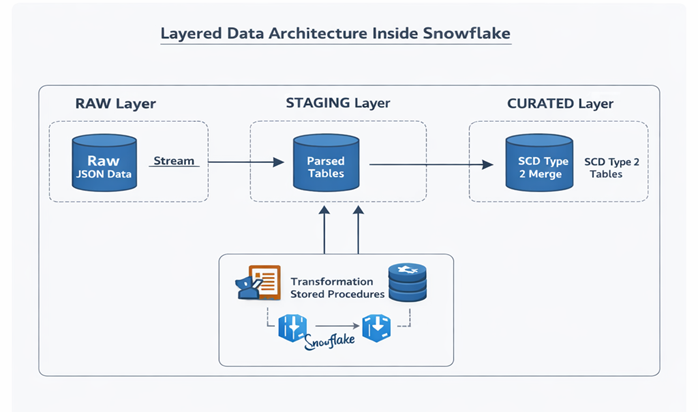
The system uses a layered architecture inside Snowflake.
RAW Layer
- Stores raw JSON data from Sage Intacct
- Immutable storage for replay and auditing
- No transformations applied
STAGING Layer
- JSON parsed into structured columns
- Data types validated
- Metadata columns added
CURATED Layer
- Business-ready financial tables
- SCD Type 2 logic applied
- Optimized for analytics workloads
This layered design improves:
- Data governance
- Debugging capability
- Pipeline resilience
6. Implementation
6.1 Setup
Infrastructure setup included:
Snowflake configuration:
- Creating databases and schemas
- Setting up warehouses
- Creating roles and access controls
AWS infrastructure:
- Amazon S3 bucket for API landing data
- IAM roles and policies for Snowflake access
- AWS Secrets Manager for API credentials
6.2 Core Build Steps
Step 1 — Sage Intacct API Authentication
The pipeline authenticates using the Sage XML API. A session is created by sending an XML request:
Authentication requires:
- sender_id
- sender_password
- company_id
- user_id
- user_password
If any credential is missing, the API request fails. Ensuring all credentials were correctly configured resolved our initial connection issues.
Step 2 — API Data Extraction Using Python
Data extraction is implemented using a Python framework built around:
- requests
- xml.etree.ElementTree
- boto3
The script calls the readByQuery API to retrieve records. Example:
*
1000
The response contains:
- record data
- pagination metadata
- resultId for retrieving additional pages
Step 3 — Handling API Pagination
Large datasets cannot be retrieved in a single API call. Sage Intacct returns paginated responses. The pipeline uses two API operations:
- readByQuery: Retrieves the first page of results.
- readMore: Retrieves additional pages using the resultId.
This loop continues until numremaining = 0. This ensures complete extraction of large datasets.
Step 4 — Incremental Extraction Using Watermarks
Since Sage Intacct does not provide native CDC, incremental loading is implemented using the WHENMODIFIED column. Process:
- Extract records where
WHENMODIFIED > last watermark - Store watermark in S3 tracking files
- Use stored watermark for the next run
The script also tracks RECORDNO and LINE_NO (for GLENTRY). This ensures deterministic incremental extraction without duplicates.
Step 5 — Optimized File Generation
Extracted records are written as: compressed JSON (.json.gz)
Advantages:
- Smaller file sizes
- Faster network transfer
- Faster Snowflake ingestion
Files are split automatically when they reach the configured size limit.
Step 6 — Cloud Landing in Amazon S3
Extracted files are uploaded to S3 using structured paths:
    S3_BUCKET/

      sage/

        GLENTRY/

        VENDOR/

        APPAYMENT/
This organization simplifies:
- debugging
- replaying loads
- incremental tracking
Step 7 — Automated Snowflake Ingestion
Snowflake Snowpipe is configured to automatically ingest files from S3. Components created:
- Storage Integration
- External Stage
- Snowpipe
- Event notifications
This enables continuous ingestion as soon as new files arrive in S3.
Step 8 — Incremental Processing Using Streams & Tasks
Snowflake Streams capture new records arriving in the RAW layer. Tasks automatically trigger stored procedures to:
- Parse JSON records
- Transform data
- Load structured tables
Step 9 — Implementing SCD Type 2
To track historical changes, the curated layer implements SCD Type 2 logic. Key columns include:
IS_CURRENTEFFECTIVE_FROMEFFECTIVE_TO
This enables tracking of historical changes for financial entities.
Step 10 — Pipeline Scheduling with AWS Fargate
Several scheduling options were evaluated:
| Option | Challenge |
|---|---|
| Lambda | Timeout limitations |
| EC2 | Operational overhead |
| Fargate | Fully managed container execution |
Due to network restrictions and infrastructure constraints, AWS Fargate was selected. EventBridge triggers the container daily to run the extraction pipeline.

7. Validation & Testing
7.1 Data Validation
Validation checks include:
- Row counts:
SELECT COUNT(*) FROM raw_table; - Duplicate detection:
GROUP BY primary_key HAVING COUNT(*) > 1 - Freshness verification: Using the latest
WHENMODIFIEDtimestamp.
7.2 Reconciliation
Periodic reconciliation ensures consistency between Sage Intacct and Snowflake. Checks include:
- Record counts
- Financial totals
- Incremental range validation
8. Security & Access
Security was implemented using multiple layers.
Snowflake permissions:
- RBAC for ingestion pipelines
- Separate roles for ETL and analytics
Credential management:
- AWS Secrets Manager stores Sage API credentials
- Scripts retrieve credentials dynamically
Auditability:
- Snowflake query history
- S3 access logs
- AWS CloudWatch logs
9. Performance & Cost
9.1 Performance Considerations
Optimizations implemented:
- Efficient API pagination
- Compressed file formats
- Parallel Snowpipe ingestion
Warehouse sizing:
- XS warehouse for ingestion tasks
- Larger warehouses for transformations
9.2 Cost Drivers
Primary cost components:
- Snowflake compute
- Snowflake storage
- S3 storage
- API extraction compute
9.3 Cost Controls
Cost optimization strategies include:
- Warehouse auto-suspend
- Incremental extraction
- Efficient file sizes
10. Operations & Monitoring
10.1 What to Monitor
Key operational metrics:
- API extraction success rates
- Data freshness
- Snowpipe ingestion status
- Warehouse utilization
10.2 Alerting
Alerts trigger when:
- API extraction fails
- Snowpipe ingestion stops
- Data ingestion delays occur
10.3 Runbook
| Issue | Resolution |
|---|---|
| Snowpipe not loading files | Run pipe refresh |
| Stream empty on first load | Run initial full load |
| API pagination failures | Retry extraction |
11. Common Pitfalls
- Missing sender credentials during authentication
- Ignoring pagination limits
- Not implementing watermark tracking
- Running unnecessary full loads
- Hardcoding credentials in scripts
12. Variations / Use Cases
This architecture can also support:
- Other SaaS API integrations
- ERP system migrations
- Financial analytics platforms
- Data lake ingestion pipelines
13. Next Steps
Organizations planning similar migrations should:
- Design API extraction strategies early
- Implement layered Snowflake architecture
- Automate ingestion pipelines from day one
- Implement monitoring and alerting
Conclusion
Migrating data from Sage Intacct to Snowflake requires more than simply calling APIs. By combining:
- Sage XML API extraction
- Python-based ingestion pipelines
- Amazon S3 landing architecture
- Snowpipe automated ingestion
- Streams and Tasks for incremental processing
- AWS Fargate for orchestration
organizations can build a scalable, automated, and resilient financial data pipeline. This architecture not only enables reliable data migration but also creates a foundation for modern cloud-based financial analytics platforms.

Srikar Mandava
Associate Data Engineer
Boolean Data Systems

Associate Data Engineer focused on designing scalable cloud data pipelines and modern data platforms. Skilled in Python, SQL, and Snowflake, with experience in ETL automation, large-scale data transformation, and building reliable data ingestion frameworks.
About Boolean Data
Systems
Boolean Data Systems is a Snowflake Premier Partner that implements solutions on cloud platforms. We help enterprises make better business decisions with data and solve real-world business analytics and data challenges.
Services and
Offerings
Follow us on
Solutions &
Accelerators
Global
Head Quarters
USA - Atlanta
3970 Old Milton Parkway,
Suite #200, Alpharetta, GA 30005
Ph. : 770-410-7770
Fax : 855-414-2865