Stop Guessing Why Pipelines Fail: Building Real-Time Observability with Snowflake Event Tables
Chand Syed
1. Executive Summary
- A task status can tell teams that work failed; it rarely provides the full explanation on its own.
- Snowflake event tables capture supported logs, traces, metrics, and events in a predefined, OpenTelemetry-aligned structure [1][2].
- A useful observability design links collection settings, diagnostic SQL, ownership, security, and retention.
- A continuous worked example connects event-table setup, Python logging, trace events, execution, and investigation.
2. Background
Imagine an overnight transformation that fails after processing thousands of records. The first question is whether it failed; the harder questions are where, why, and whether the same issue occurred yesterday. Query history and task history are important, but supported application and platform telemetry can add diagnostic context. Snowflake event tables are specialized tables for telemetry records, not business event queues or substitutes for application transaction tables [1].
Architecture principle: Collect the signals needed to answer operational questions, then make those signals discoverable without exposing unnecessary runtime data.
3. Problem
3.1 Symptoms
- A scheduled operation reports failure but the underlying error context is difficult to locate.
- Troubleshooting depends on screenshots, copied messages, or one engineer’s local knowledge.
- Teams mix application logs with platform events and assume all records have the same shape.
- High-volume diagnostic logging is enabled without an investigation or retention plan.
3.2 Impact
When evidence is scattered, repeated incidents take longer to compare and resolve. An alert without context may notify an owner but still leave the team reconstructing what happened. The aim is not to collect everything: it is to reduce the distance between an abnormal signal and a defensible operational decision.
4. Requirements & Assumptions
4.1 Data & SLA
- Confirm which workloads emit supported telemetry and which records are available for the target feature.
- Define the incident questions, response ownership, investigation window, and acceptable monitoring delay.
- Set retention according to operational and regulatory needs rather than assuming indefinite storage.
4.2 Security & Compliance
- Treat exception messages and log payloads as potentially sensitive. Do not emit credentials or unnecessary personal data.
- Grant read access to approved operational roles, and consider filtered views for different support teams.
- Separate privileges for event-table creation, telemetry configuration, and record investigation.
4.3 Tooling & Constraints
Telemetry capture depends on the emitting feature, logging or tracing level, and active event-table configuration. A newly created event table does not automatically receive all account telemetry. Confirm supported record types and the required configuration before interpreting empty query results [1][3]. “Real-time” here means operationally timely telemetry, not guaranteed zero-latency delivery.
Example — Inspect account telemetry settings
SHOW PARAMETERS LIKE 'EVENT_TABLE' IN ACCOUNT;
SHOW PARAMETERS LIKE 'LOG_LEVEL' IN ACCOUNT;
4.4 Logging, Tracing, Metrics and Platform Events: Different Questions
Logs describe discrete application messages such as a validation warning, exception or checkpoint. Trace spans represent units of work; span events mark milestones inside a span. Metrics summarize quantities over time, while platform EVENT records describe supported Snowflake operational activity. These signals are complementary, not interchangeable. An application log does not automatically provide a complete distributed trace, and a task execution event does not replace application exception details.
An investigation should answer four questions in sequence: what failed (task/query status), which operation failed (span and event name), why it failed (exception and structured log context), and what changed (history, configuration and recent deployments). Keep the business run ID, Snowflake query ID and system trace/span IDs distinct. Join only on documented attributes that actually exist in emitted records.
4.5 Preconditions and Deployment Safety
The walkthrough assumes a Snowflake account where event tables and Python procedure telemetry are supported, a running warehouse, permission to create a database/schema/procedure, and administrator approval before changing account-wide event-table routing. Use a development account or isolated environment first. Do not overwrite an existing account event-table setting without a change plan; preserve the prior configuration for rollback. Package availability and Python runtime support must be checked in the target account.
5. Recommended Architecture
5.1 High-Level Flow
Supported Snowflake components emit telemetry. Account- or object-level settings determine collection. Records land in the configured event table. Restricted SQL queries or views turn raw telemetry into incident-specific evidence. Operators correlate the evidence with task or query history, investigate, resolve, and validate.
5.2 Architecture Diagram
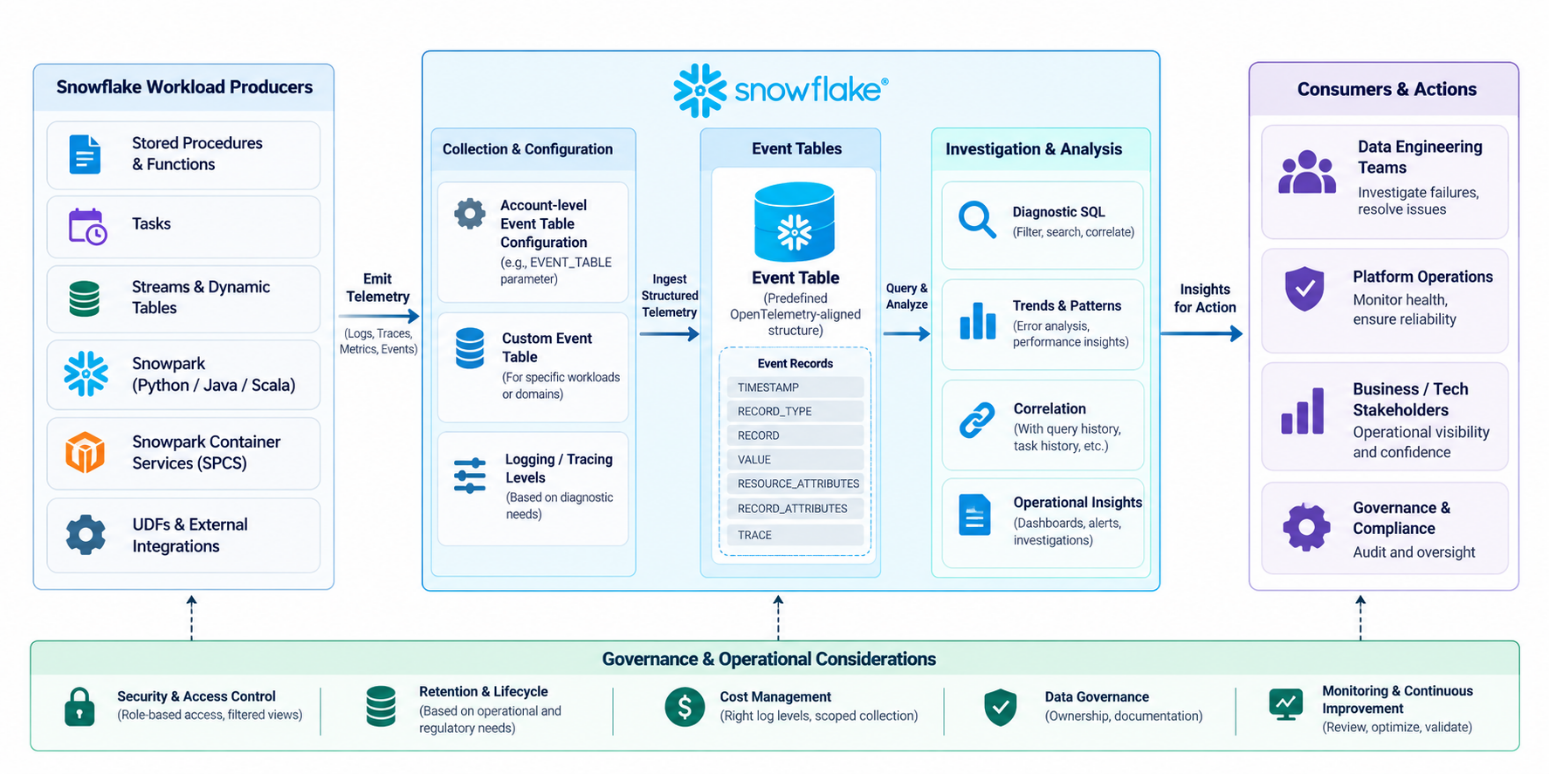
Figure 1. Reference architecture for Snowflake telemetry collection and operational consumption.
5.3 Anatomy of an Event Record
Event tables expose predefined columns including TIMESTAMP, RECORD_TYPE, RECORD, VALUE, RESOURCE_ATTRIBUTES, RECORD_ATTRIBUTES, and TRACE. The information present depends on the producer and record type. For example, LOG rows and platform EVENT rows should be inspected using their respective documented shapes [2].
Example — Count available telemetry record types
SELECT
    RECORD_TYPE,
    COUNT(*) AS RECORD_COUNT
FROM OBSERVABILITY_DB.MONITORING.APP_EVENTS
WHERE TIMESTAMP >= DATEADD(
    'day', -1, CURRENT_TIMESTAMP()
)
GROUP BY RECORD_TYPE
ORDER BY RECORD_COUNT DESC;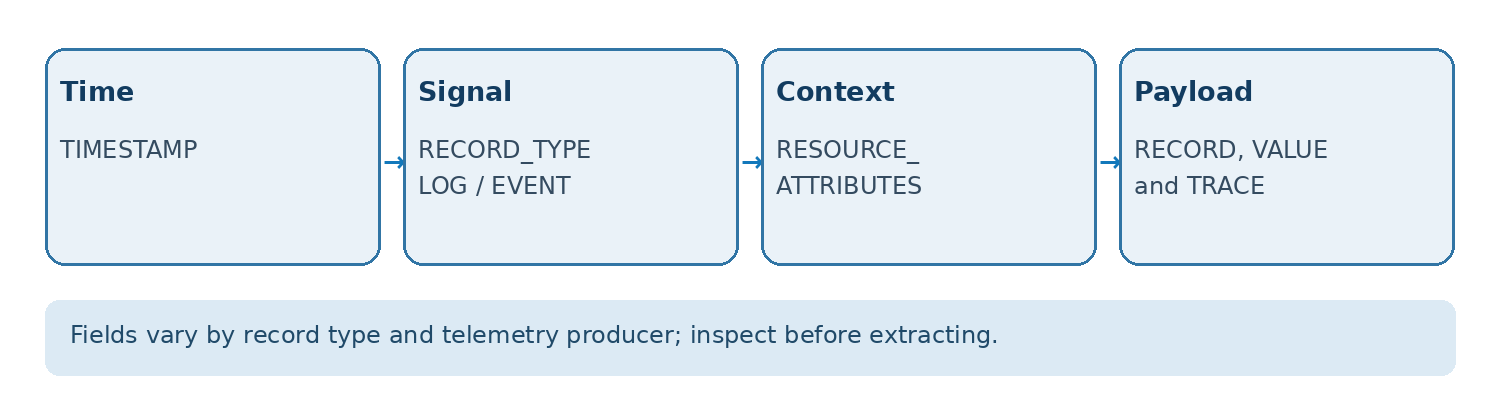
Figure 2. Simplified field map; the diagram is illustrative rather than a complete schema.
5.4 Correlation Architecture: From Pipeline Run to Trace
For every execution, generate an application-level run ID before invoking the procedure. Emit the same identifier in the starting log, validation log, error log and trace-event attributes. Query the event table first by record type and time window, then inspect the available semi-structured attributes. The TRACE column carries system trace/span identifiers for trace-enabled records. Do not assume that Python logging extra fields, trace event attributes and platform event attributes share the same JSON path or naming convention.
Example — Inspect raw event shapes before correlation
-- Inspect actual fields before choosing JSON paths.
SELECT
    RECORD_TYPE,
    RECORD,
    RECORD_ATTRIBUTES,
    TRACE,
    RESOURCE_ATTRIBUTES,
    VALUE
FROM OBSERVABILITY_DB.MONITORING.APP_EVENTS
WHERE TIMESTAMP >= DATEADD(
    'hour', -2, CURRENT_TIMESTAMP()
)
  AND RECORD_TYPE IN ('LOG', 'SPAN_EVENT', 'SPAN')
ORDER BY TIMESTAMP DESC
LIMIT 30;
6. Implementation
The numbered steps below are one continuous, development-only implementation. Run them in order and keep the database, schema, procedure, and run IDs unchanged throughout the example. Independent diagnostic snippets elsewhere in the blog are labeled “Example.” Changing account-level event-table routing requires administrator approval.
Step 1 — Create and configure the event table
-- Run with an authorized administrative role in a test account.
CREATE DATABASE IF NOT EXISTS OBSERVABILITY_DB;

CREATE SCHEMA IF NOT EXISTS
    OBSERVABILITY_DB.MONITORING;

CREATE EVENT TABLE IF NOT EXISTS
    OBSERVABILITY_DB.MONITORING.APP_EVENTS;

-- Inspect the existing routing before changing it.
SHOW PARAMETERS LIKE 'EVENT_TABLE' IN ACCOUNT;

-- Change account-wide routing only with prior approval.
ALTER ACCOUNT SET EVENT_TABLE =
    OBSERVABILITY_DB.MONITORING.APP_EVENTS;

SHOW EVENT TABLES IN SCHEMA
    OBSERVABILITY_DB.MONITORING;

SHOW PARAMETERS LIKE 'EVENT_TABLE' IN ACCOUNT;
This Python procedure emits both structured logs and trace events. It uses one application run ID throughout the execution and deliberately generates a controlled failure when the run ID ends with -FAIL. Do not log secrets or row payloads.
Step 2 — Create the instrumented Python procedure
CREATE OR REPLACE PROCEDURE
    OBSERVABILITY_DB.MONITORING.RUN_PIPELINE_DEMO(
        RUN_ID STRING
    )
RETURNS STRING
LANGUAGE PYTHON
RUNTIME_VERSION = '3.12'
PACKAGES = (
    'snowflake-snowpark-python',
    'snowflake-telemetry-python'
)
HANDLER = 'run'
AS $$
import logging
from snowflake import telemetry

logger = logging.getLogger('pipeline_observability')

def run(session, run_id):
    attrs = {'run_id': run_id}
    telemetry.set_span_attribute('pipeline.run_id', run_id)
    telemetry.add_event('pipeline.started', attrs)
    logger.info('Pipeline started', extra=attrs)

    try:
        row_count = session.sql(
            'SELECT COUNT(*) '
            'FROM TABLE(GENERATOR(ROWCOUNT => 5))'
        ).collect()[0][0]

        checkpoint = {
            'run_id': run_id,
            'rows_checked': int(row_count)
        }
        logger.info('Validation completed', extra=checkpoint)
        telemetry.add_event(
            'pipeline.validation.complete', checkpoint
        )

        if run_id.endswith('-FAIL'):
            raise ValueError(
                'Controlled validation failure for the demo'
            )

        logger.info('Pipeline completed', extra=attrs)
        telemetry.add_event('pipeline.completed', attrs)
        return 'SUCCESS'

    except Exception:
        logger.exception('Pipeline execution failed', extra=attrs)
        telemetry.add_event('pipeline.failed', attrs)
        raise
$$;
Step 3 — Enable logging and tracing for the procedure
ALTER PROCEDURE
    OBSERVABILITY_DB.MONITORING.RUN_PIPELINE_DEMO(
        STRING
    )
SET
    LOG_LEVEL = 'INFO'
    TRACE_LEVEL = 'ALWAYS';
Step 4 — Run the success and controlled-failure tests
-- First execute the successful run.
CALL OBSERVABILITY_DB.MONITORING.RUN_PIPELINE_DEMO(
    'BLOG-DEMO-001'
);

-- Then execute separately: this exception is intentional.
CALL OBSERVABILITY_DB.MONITORING.RUN_PIPELINE_DEMO(
    'BLOG-DEMO-FAIL'
);
After Step 4, allow for telemetry ingestion delay. Step 5 verifies available record types, Step 6 investigates LOG records for the two demonstration runs, and Step 7 provides a wider two-hour view of LOG, SPAN_EVENT, and SPAN records. Step 7 uses COALESCE to inspect alternative run-ID paths and displays trace/span identifiers when present. As record shapes differ, inspect the available attributes before relying on any run-ID path.
Step 5 — Verify collected record types
SELECT
    RECORD_TYPE,
    COUNT(*) AS RECORD_COUNT
FROM OBSERVABILITY_DB.MONITORING.APP_EVENTS
WHERE TIMESTAMP >= DATEADD(
    'hour', -2, CURRENT_TIMESTAMP()
)
GROUP BY RECORD_TYPE
ORDER BY RECORD_COUNT DESC;
Step 6 — Investigate correlated Python log messages
SELECT
    TIMESTAMP AS LOG_TIME,
    RECORD:severity_text::STRING AS SEVERITY,
    VALUE::STRING AS MESSAGE,
    RECORD_ATTRIBUTES:run_id::STRING AS RUN_ID
FROM OBSERVABILITY_DB.MONITORING.APP_EVENTS
WHERE RECORD_TYPE = 'LOG'
  AND TIMESTAMP >= DATEADD(
      'hour', -2, CURRENT_TIMESTAMP()
  )
  AND RECORD_ATTRIBUTES:run_id::STRING IN (
      'BLOG-DEMO-001',
      'BLOG-DEMO-FAIL'
  )
ORDER BY LOG_TIME;
Step 7 — Investigate and Correlate Logs, Trace Events, and Spans
-- Step 7: Investigate and correlate logs,
-- trace events, and spans.
SELECT
    TIMESTAMP,
    RECORD_TYPE,
    COALESCE(
        RECORD_ATTRIBUTES:run_id::STRING,
        RECORD:attributes:run_id::STRING,
        RECORD_ATTRIBUTES:"pipeline.run_id"::STRING
    ) AS RUN_ID,
    RECORD:severity_text::STRING AS SEVERITY,
    RECORD:name::STRING AS TRACE_EVENT,
    VALUE::STRING AS MESSAGE,
    TRACE:trace_id::STRING AS TRACE_ID,
    TRACE:span_id::STRING AS SPAN_ID,
    TRACE
FROM OBSERVABILITY_DB.MONITORING.APP_EVENTS
WHERE TIMESTAMP >= DATEADD(
    'hour', -2, CURRENT_TIMESTAMP()
)
  AND RECORD_TYPE IN (
    'LOG',
    'SPAN_EVENT',
    'SPAN'
)
ORDER BY
    TIMESTAMP,
    RECORD_TYPE;
Step 7 retrieves recent logs, trace events, and spans; unlike Step 6, it does not filter to BLOG-DEMO-001 and BLOG-DEMO-FAIL. COALESCE returns the first non-NULL run ID from the specified paths. Ordinary LOG rows may not have trace/span IDs, and not every SPAN row contains the same custom attributes as a SPAN_EVENT. To narrow the broader timeline to the two demonstrations, apply a run-ID filter using paths confirmed in the actual telemetry.
6.1 End-to-End Execution Contract
Steps 1–4 configure and execute the same example; Steps 5–7 examine the resulting telemetry. The intentional failure CALL should be executed separately because the exception can stop a multi-statement worksheet. The labels “Step” are reserved for this sequence; all other independent snippets are labeled “Example.”
6.2 Structured Logging: Recommended Production Pattern
A stable logger name and limited structured attributes improve the utility of error investigations. INFO captures start, completion and checkpoints; WARNING records recoverable anomalies; ERROR and logger.exception() capture failures. Use run_id, stage, rows_checked and error_category rather than sensitive row values, tokens, or credentials. The helper functions below are optional Python additions to Step 2, not standalone SQL statements. Call record_failure() only within an active exception handler.
Example — Optional Python logging and tracing helpers
# Optional helpers to integrate into Step 2's Python handler.
import logging
from snowflake import telemetry

logger = logging.getLogger('pipeline_observability')

def record_checkpoint(run_id, stage, rows_checked):
    attrs = {
        'run_id': run_id,
        'stage': stage,
        'rows_checked': int(rows_checked)
    }
    logger.info('Pipeline checkpoint passed', extra=attrs)
    telemetry.add_event('pipeline.checkpoint', attrs)
    telemetry.set_span_attribute('pipeline.stage', stage)

def record_failure(run_id, stage, error_category):
    attrs = {
        'run_id': run_id,
        'stage': stage,
        'error_category': error_category
    }
    # Call inside an active except block to include traceback.
    logger.exception('Pipeline stage failed', extra=attrs)
    telemetry.add_event('pipeline.failed', attrs)
6.3 Trace IDs, Span IDs and Run IDs
The application run ID connects events across logical attempts; the system trace_id identifies a traced execution, and span_id identifies a span. For SPAN_EVENT records, Snowflake documents the event name in RECORD, event attributes in RECORD_ATTRIBUTES, and IDs in TRACE. Inspect each record type independently; the example below focuses on a failed run.
Example — Trace the intentionally failed execution
-- Investigate trace events from the controlled failure.
SELECT
    TIMESTAMP AS EVENT_TIME,
    RECORD:name::STRING AS EVENT_NAME,
    RECORD_ATTRIBUTES:run_id::STRING AS RUN_ID,
    TRACE:trace_id::STRING AS TRACE_ID,
    TRACE:span_id::STRING AS SPAN_ID,
    RECORD_ATTRIBUTES
FROM OBSERVABILITY_DB.MONITORING.APP_EVENTS
WHERE RECORD_TYPE = 'SPAN_EVENT'
  AND TIMESTAMP >= DATEADD(
      'hour', -2, CURRENT_TIMESTAMP()
  )
  AND RECORD_ATTRIBUTES:run_id::STRING =
      'BLOG-DEMO-FAIL'
ORDER BY EVENT_TIME;
The query above deliberately filters SPAN_EVENT rows because the run ID was passed to telemetry.add_event(). SPAN records may hold span-level attributes instead. To inspect a matching SPAN, reuse an actual TRACE:trace_id value from the query instead of assuming its RECORD_ATTRIBUTES also contain run_id.
6.4 Controlled Failure and Root-Cause Walkthrough
The sample intentionally raises ValueError when the run ID ends in -FAIL. This proves that a failed procedure can emit an exception log and a failure trace milestone; it is not a production data-quality check. For a real pipeline, replace the condition with a threshold check (for example, zero valid records, duplicate business keys, or an unexpected schema) and raise a meaningful error without exposing raw records.
Example — Review both executions as a timeline
SELECT
    TIMESTAMP AS OBSERVED_AT,
    RECORD_TYPE,
    COALESCE(
        RECORD_ATTRIBUTES:run_id::STRING,
        RECORD_ATTRIBUTES:"pipeline.run_id"::STRING
    ) AS RUN_ID,
    RECORD:severity_text::STRING AS SEVERITY,
    RECORD:name::STRING AS TRACE_EVENT,
    VALUE::STRING AS MESSAGE,
    TRACE
FROM OBSERVABILITY_DB.MONITORING.APP_EVENTS
WHERE TIMESTAMP >= DATEADD(
    'hour', -2, CURRENT_TIMESTAMP()
)
  AND RECORD_TYPE IN ('LOG', 'SPAN_EVENT', 'SPAN')
ORDER BY OBSERVED_AT, RECORD_TYPE;
Investigation sequence: (1) identify the failure timestamp from the failed CALL; (2) find ERROR-level or exception log records near that time; (3) identify the failure trace event and available trace ID; (4) compare the checkpoint events with the successful run; (5) correlate with Snowflake query/task history using confirmed query IDs or timestamps; (6) correct the root cause and rerun with a new run ID. Do not interpret a successful telemetry query as proof that the pipeline itself succeeded.
6.5 Configuration Defaults
- Start with one supported workload and the least verbose collection level that answers the diagnostic question.
- Use timestamp predicates and select only the attributes needed for the investigation.
- Document who owns the event table, the monitoring queries, and the retention policy.
7. Validation & Testing
7.1 Functional Validation
- Verify the intended workload emits telemetry and the correct event table is active.
- Execute BLOG-DEMO-001 and BLOG-DEMO-FAIL; confirm that success and failure produce distinguishable evidence.
- Inspect LOG and EVENT records separately; do not reuse the same JSON paths blindly.
- Test the read-only operational role and confirm unauthorized access is denied.
- Compare incident evidence with relevant task or query history before assigning a root cause.
Example — Validate recent telemetry volume
SELECT
    RECORD_TYPE,
    COUNT(*) AS RECORDS_FOUND,
    MIN(TIMESTAMP) AS FIRST_SEEN,
    MAX(TIMESTAMP) AS LAST_SEEN
FROM OBSERVABILITY_DB.MONITORING.APP_EVENTS
WHERE TIMESTAMP >= DATEADD(
    'minute', -30, CURRENT_TIMESTAMP()
)
GROUP BY RECORD_TYPE
ORDER BY RECORD_TYPE;
Example — Validate both test runs by signal type
-- Check run-specific LOG and SPAN_EVENT signal coverage.
SELECT
    RECORD_ATTRIBUTES:run_id::STRING AS RUN_ID,
    RECORD_TYPE,
    COUNT(*) AS RECORD_COUNT
FROM OBSERVABILITY_DB.MONITORING.APP_EVENTS
WHERE TIMESTAMP >= DATEADD(
    'hour', -2, CURRENT_TIMESTAMP()
)
  AND RECORD_TYPE IN ('LOG', 'SPAN_EVENT')
  AND RECORD_ATTRIBUTES:run_id::STRING IN (
      'BLOG-DEMO-001',
      'BLOG-DEMO-FAIL'
  )
GROUP BY RUN_ID, RECORD_TYPE
ORDER BY RUN_ID, RECORD_TYPE;
Expected evidence is at least one matching LOG and one matching SPAN_EVENT for each run when configured telemetry arrives. Counts depend on the emitting runtime and ingestion latency. If the query returns no rows, inspect unfiltered records first rather than assuming the run failed to emit telemetry.
7.2 Diagnostic Evaluation
A query returning rows is not proof that observability works. Validate that the same run identifier is present in the expected log and trace records, inspect the controlled failure message, and reconstruct the execution timeline. Confirm the actual record shapes in the target account before relying on a dashboard.
7.3 Test Evidence and Acceptance Criteria
Acceptance criteria: the successful CALL returns SUCCESS; the controlled failure raises the documented test exception; at least one start/checkpoint log is visible for the successful run; the failed run produces a failure log with error context; one or more trace events appear when tracing is enabled; and the two executions can be distinguished using observed attributes or trace IDs. Record actual screenshots or query results from the target account before publishing the example as executed.
Example — Verify log and trace-event coverage
SELECT
    RECORD_TYPE,
    RECORD:severity_text::STRING AS SEVERITY,
    RECORD:name::STRING AS TRACE_EVENT,
    COUNT(*) AS RECORD_COUNT,
    MIN(TIMESTAMP) AS FIRST_SEEN,
    MAX(TIMESTAMP) AS LAST_SEEN
FROM OBSERVABILITY_DB.MONITORING.APP_EVENTS
WHERE TIMESTAMP >= DATEADD(
    'hour', -2, CURRENT_TIMESTAMP()
)
  AND RECORD_TYPE IN ('LOG', 'SPAN_EVENT', 'SPAN')
GROUP BY RECORD_TYPE, SEVERITY, TRACE_EVENT
ORDER BY LAST_SEEN DESC;
Expected evidence (illustrative, not measured): success has a start log, checkpoint log and trace milestone; controlled failure has the same initial signals plus an exception/error log and failure milestone. Counts and arrival times depend on collection settings, feature support and ingestion latency. Capture the actual record shapes rather than promising exact row counts.
8. Security & Access
Runtime telemetry can reveal object names, exception text and user-supplied attributes. Use role-based access and governed views rather than granting every analyst direct SELECT on the event table. Section 8.1 shows the required order: create role, grant usage, create the view, then grant SELECT.
8.1 Least-Privilege Setup and Operational Views
An authorized administrator and schema owner should execute the single code example below from top to bottom. First create the monitoring role, then grant database and schema USAGE, create a restricted operational view, and finally grant SELECT on that view. This example intentionally does not grant the reader role SELECT on the raw event table. Validate both the permitted and denied access paths after deployment.
Example — Create the reader role and restricted view in order
-- Execute top to bottom with an authorized administrator.
-- 1. Create the monitoring role first.
CREATE ROLE IF NOT EXISTS OBSERVABILITY_READER;

-- 2. Grant access to the containing database and schema.
GRANT USAGE ON DATABASE OBSERVABILITY_DB
    TO ROLE OBSERVABILITY_READER;

GRANT USAGE ON SCHEMA OBSERVABILITY_DB.MONITORING
    TO ROLE OBSERVABILITY_READER;

-- 3. Create an operational view using an authorized owner.
-- The view is intentionally narrower than the raw event table.
CREATE OR REPLACE VIEW
    OBSERVABILITY_DB.MONITORING.V_ERROR_LOGS
AS
SELECT
    TIMESTAMP AS LOG_TIME,
    RECORD:severity_text::STRING AS SEVERITY,
    VALUE::STRING AS MESSAGE
FROM OBSERVABILITY_DB.MONITORING.APP_EVENTS
WHERE RECORD_TYPE = 'LOG'
  AND RECORD:severity_text::STRING IN (
      'ERROR', 'FATAL'
  );

-- 4. Grant read access to the view, not the raw event table.
GRANT SELECT ON VIEW
    OBSERVABILITY_DB.MONITORING.V_ERROR_LOGS
TO ROLE OBSERVABILITY_READER;

-- 5. Check the role's granted privileges.
SHOW GRANTS TO ROLE OBSERVABILITY_READER;
The demonstration view exposes message text to authorized readers. Review it for sensitive values and add appropriate masking/redaction before production use; a filtered view alone does not guarantee de-identification.
9. Performance & Cost
9.1 Performance Considerations
Large event tables can make broad investigations expensive. Filter by time and record type, narrow resource attributes when appropriate, and avoid repeatedly selecting every semi-structured field. Evaluate query behavior against realistic telemetry volume.
Example — Review logging volume by hour
SELECT
    DATE_TRUNC('hour', TIMESTAMP) AS LOG_HOUR,
    COUNT(*) AS LOG_COUNT
FROM OBSERVABILITY_DB.MONITORING.APP_EVENTS
WHERE RECORD_TYPE = 'LOG'
  AND TIMESTAMP >= DATEADD(
      'hour', -12, CURRENT_TIMESTAMP()
  )
GROUP BY LOG_HOUR
ORDER BY LOG_HOUR;
9.2 Cost Drivers
- Telemetry collection and storage volume, influenced by producer activity and configured levels.
- Compute used for exploratory queries, recurring dashboards, and transformations.
- Operational overhead of retention, role administration, and incident-response processes.
9.3 Cost Controls
- Avoid unrestricted debug-level collection in steady-state production.
- Use focused investigation queries and review expensive recurring monitoring jobs.
- Retain telemetry according to defined investigation and compliance needs.
9.4 Practical Cost and Volume Diagnostics
The largest controllable cost drivers are telemetry verbosity, retention volume and repeated investigation queries. Use daily counts to identify sudden collection growth, then consult Snowflake account usage and billing surfaces for actual storage/compute charges. A record count is an activity proxy, not a credit estimate.
Example — Review telemetry volume by day
-- Record counts indicate activity, not credit consumption.
SELECT
    DATE_TRUNC('day', TIMESTAMP) AS EVENT_DAY,
    RECORD_TYPE,
    COUNT(*) AS RECORDS
FROM OBSERVABILITY_DB.MONITORING.APP_EVENTS
WHERE TIMESTAMP >= DATEADD(
    'day', -14, CURRENT_TIMESTAMP()
)
GROUP BY EVENT_DAY, RECORD_TYPE
ORDER BY EVENT_DAY DESC, RECORDS DESC;
10. Operations & Monitoring
10.1 What to Monitor
- Error log trends for explicitly supported workloads.
- Availability of expected telemetry and sudden changes in record volume.
- Investigation-query performance, access exceptions, and retention behavior.
10.2 Alerting
Alerts should connect to a response plan: an owner, severity rule, diagnostic query, and resolution check. Do not alert on every log entry. First distinguish transient warnings from conditions that require intervention.
Example — Review hourly error-log trends
SELECT
    DATE_TRUNC('hour', TIMESTAMP) AS ERROR_HOUR,
    COUNT(*) AS ERROR_LOG_COUNT
FROM OBSERVABILITY_DB.MONITORING.APP_EVENTS
WHERE RECORD_TYPE = 'LOG'
  AND RECORD:severity_text::STRING = 'ERROR'
  AND TIMESTAMP >= DATEADD(
      'day', -1, CURRENT_TIMESTAMP()
  )
GROUP BY ERROR_HOUR
ORDER BY ERROR_HOUR DESC;
10.3 Runbook (Top Issues)
- No records found → verify the emitter, collection level, event-table assignment, and query window.
- Unexpected JSON field → inspect RECORD_TYPE and producer documentation before changing extraction logic.
- Excessive volume → review logging levels, high-volume emitters, query patterns, and retention.
- Sensitive content observed → restrict access, stop further emission, and follow the organization’s data-handling procedure.
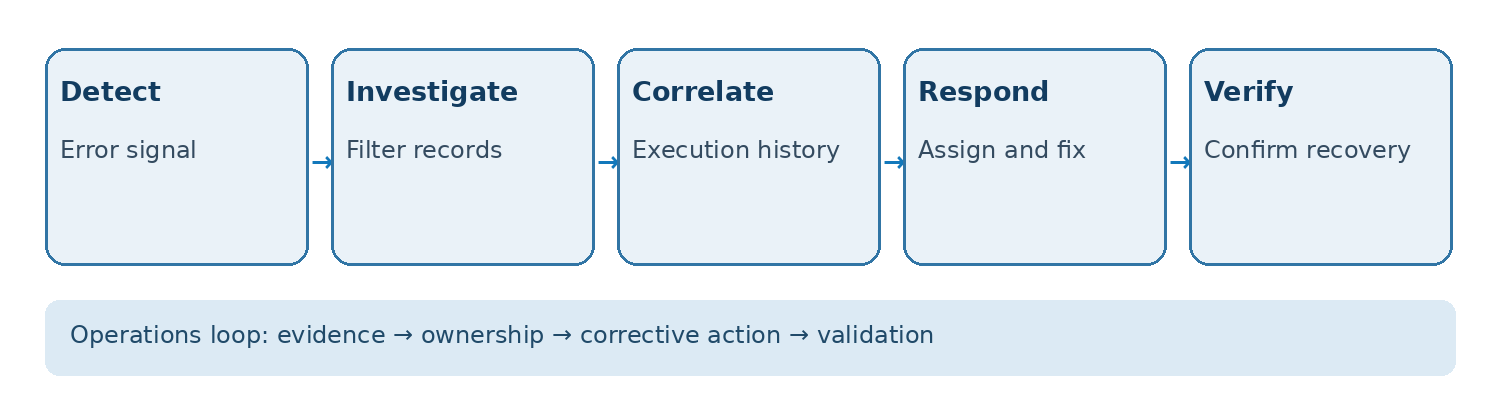
Figure 3. An operational workflow that turns telemetry into an accountable incident response.
10.4 From Diagnostic Query to Actionable Alert
The hourly ERROR query above is a monitoring dataset; it does not itself schedule an alert or send notifications. A production design needs a supported scheduling mechanism, a documented threshold, deduplication, an incident owner, a notification integration, and a recovery check. Confirm the account supports the selected alerting mechanism and privileges before deploying it.
Example — Evaluate an alert condition over 15 minutes
-- Condition query only; SELECT does not send an alert.
SELECT
    COUNT(*) AS ERRORS_IN_LAST_15_MIN
FROM OBSERVABILITY_DB.MONITORING.APP_EVENTS
WHERE RECORD_TYPE = 'LOG'
  AND RECORD:severity_text::STRING IN (
      'ERROR', 'FATAL'
  )
  AND TIMESTAMP >= DATEADD(
      'minute', -15, CURRENT_TIMESTAMP()
  );
-- Evaluate on a schedule with deduplication and ownership.
10.5 Troubleshooting Decision Tree
No telemetry: confirm account EVENT_TABLE routing, procedure LOG_LEVEL and TRACE_LEVEL, supported emitter, privileges, execution time and ingestion delay. Logs but no traces: check TRACE_LEVEL, the telemetry library and trace-event producer support. Traces but no run ID: inspect RECORD_ATTRIBUTES and TRACE without filtering and revise the correlation query to match observed data. Duplicate incidents: group by a stable pipeline/run identifier and apply deduplication in the alerting workflow. High cost: lower verbosity, reduce recurring scans and define retention. Failed procedure but no error log: inspect the procedure exception handler and logging threshold before assuming Snowflake dropped a record.
11. Common Pitfalls
- Assuming CREATE EVENT TABLE automatically captures every signal.
- Treating event tables as replacements for task history, query history, or audit controls.
- Interpreting all RECORD_TYPE values as ordinary application logs.
- Collecting detailed payloads without reviewing their sensitivity.
- Measuring dashboard activity instead of incident resolution quality.
12. Variations / Use Cases
- Stored procedure diagnostics: investigate application error messages and correlate them with execution history.
- Task operations: use documented task execution events where supported, while preserving task history as a complementary source [6].
- Dynamic table operations: review supported refresh events and other monitoring surfaces for refresh investigations [7].
- Snowpark Container Services: examine supported service telemetry with service-specific attributes and time filters [8].
12.1 Extended Enterprise Use Cases
Ingestion pipelines: log source discovery, schema validation, accepted/rejected record counts and retry reasons. Transformation pipelines: record model/stage checkpoints and failure categories without logging sensitive data. Task-driven workflows: combine task execution history with application telemetry when both are available. Dynamic tables: combine documented refresh monitoring with relevant event records, recognizing that support and record shape differ by feature. Snowpark Container Services: use service-specific telemetry and resource attributes. Each scenario requires feature-level validation; do not imply every Snowflake workload emits identical signals.
12.2 Observability Maturity Model
Level 1—visibility: a supported event table, minimal logging and a documented owner. Level 2—diagnosis: stable run IDs, trace milestones, failure categories and reusable investigation SQL. Level 3—operations: alerts with thresholds, incident runbooks, role-scoped views and retention controls. Level 4—continuous improvement: review false-positive rates, time-to-diagnose, recurring failures, telemetry cost and access-policy exceptions. Advance only after the prior level produces reliable evidence.
13. Next Steps
Begin with one business-critical workload. Confirm the supported telemetry, configure collection, test a controlled incident, and build two or three reusable queries. Only after the investigation path works should the team introduce dashboards, alerts, and broader collection.
At Boolean Data Systems, we view event tables as an operational evidence layer rather than a logging destination. Their value comes from the discipline around them: clear ownership, appropriately scoped telemetry, governed access, and a repeatable path from detection to verified recovery.
13.1 Production Readiness Checklist
Before production: validate Python package/runtime support; confirm EVENT_TABLE assignment and rollback owner; test both success and failure; verify LOG and SPAN_EVENT field paths in actual records; correlate application run IDs with system trace IDs; establish least-privilege views; define acceptable ingestion delay, monitoring thresholds, retention and on-call ownership; review sensitive log content; and collect account-specific test evidence. These controls turn a technically interesting example into a supportable operational pattern.
13.2 Scope and Limitations
This article provides a reference implementation, not a claim of execution in a live Snowflake account. Some record types and fields are emitter-specific; settings and privileges depend on the account and feature. The sample failure is intentionally simulated. Real-time means operationally timely rather than instantaneous telemetry. SQL snippets involving account configuration must be reviewed by an authorized administrator.
14. Resources & Further Reading
Primary Snowflake documentation referenced for technical details. Availability and configuration requirements should be rechecked for the target account before production use.
[1] Snowflake Documentation — Event table setup: https://docs.snowflake.com/en/developer-guide/logging-tracing/event-table-setting-up
[2] Snowflake Documentation — Event table columns: https://docs.snowflake.com/en/developer-guide/logging-tracing/event-table-columns
[3] Snowflake Documentation — CREATE EVENT TABLE: https://docs.snowflake.com/en/sql-reference/sql/create-event-table
[4] Snowflake Documentation — EVENTS_VIEW: https://docs.snowflake.com/en/sql-reference/telemetry/events_view
[5] Snowflake Documentation — Accessing log messages: https://docs.snowflake.com/en/developer-guide/logging-tracing/logging-accessing-messages
[6] Snowflake Documentation — Task execution events: https://docs.snowflake.com/en/user-guide/tasks-events
[7] Snowflake Documentation — Dynamic table monitoring: https://docs.snowflake.com/en/user-guide/dynamic-tables/monitoring
[8] Snowflake Documentation — Snowpark Container Services monitoring: https://docs.snowflake.com/en/developer-guide/snowpark-container-services/monitoring-services
[9] Snowflake Documentation — Logging messages in Python: https://docs.snowflake.com/en/developer-guide/logging-tracing/logging-python
[10] Snowflake Documentation — Emitting trace events in Python: https://docs.snowflake.com/en/developer-guide/logging-tracing/tracing-python
[11] Snowflake Documentation — How trace events are represented: https://docs.snowflake.com/en/developer-guide/logging-tracing/tracing-how-events-work

Chand Syed
Associate Data Engineer
Boolean Data Systems
Associate Data Engineer at Boolean Data Systems with experience in Snowflake, Matillion ETL, and cloud data pipelines. Skilled in building scalable ETL/ELT workflows, transforming data for analytics, and supporting modern cloud data architectures. Certified in Matillion ETL, Data Productivity, and Cloud Foundations.
About Boolean Data
Systems
Boolean Data Systems is a Snowflake Premier Partner that implements solutions on cloud platforms. We help enterprises make better business decisions with data and solve real-world business analytics and data challenges.
Services and
Offerings
Follow us on
Solutions &
Accelerators
Global
Head Quarters
USA - Atlanta
3970 Old Milton Parkway,
Suite #200, Alpharetta, GA 30005
Ph. : 770-410-7770
Fax : 855-414-2865